Navigating the Azure Data Ecosystem: When to Use Databricks vs. Azure Data Factory
 By Inkey Solutions
December 16, 2025
4 min read
By Inkey Solutions
December 16, 2025
4 min read
In the realm of data engineering and analytics, choosing the right tools can make or break your project. Azure offers two powerful options: Databricks and Azure Data Factory (ADF). While both are incredibly robust, they serve different purposes and are suited to different scenarios. In this blog, I’ll dive deep into when to use Databricks and when ADF is the better choice, offering insights that go beyond the typical comparisons you might find online.
Understanding Databricks and Azure Data Factory
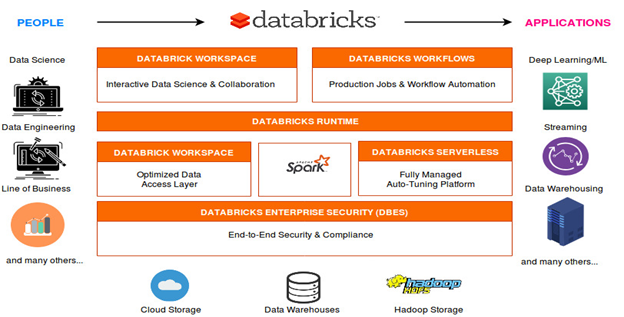
Azure Databricks: Azure Databricks is an Apache Spark-based analytics platform that’s optimized for Azure. It’s a unified analytics platform for big data and AI, making it a favorite among data engineers, data scientists, and analysts who want to collaborate seamlessly.
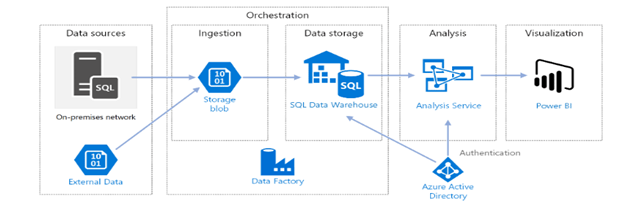
Azure Data Factory: Azure Data Factory is a cloud-based data integration service. It allows you to create, schedule, and orchestrate ETL (extract, transform, load) workflows at scale. ADF excels at integrating data from various sources, transforming it, and loading it into target data stores.
When to Use Databricks
Complex Data Processing and Transformations:
- Scenario: Handling large datasets with extensive transformations.
- Why Databricks: Databricks excels with its robust Apache Spark engine, perfect for complex transformations and distributed data Its parallel processing capabilities make it ideal for heavy data engineering tasks.
Advanced Analytics and Machine Learning:
- Scenario: Your project involves advanced analytics or machine learning models.
- Why Databricks: With seamless integration with MLflow and built-in support for machine learning libraries, Databricks is a go-to for data scientists. It streamlines the development and deployment of ML models with collaborative notebooks and powerful ML capabilities.
Real-Time Data Processing:
- Scenario: Processing and analyzing data in real-time.
- Why Databricks: Databricks supports structured streaming, making it perfect for real-time analytics, fraud detection, and live monitoring scenarios.
Interactive Data Exploration:
- Scenario: Need for an interactive environment for data exploration and visualization.
- Why Databricks: Databricks notebooks offer an interactive and collaborative environment where you can explore data, create visualizations, and share insights in real-time.
When to Use Azure Data Factory
ETL and ELT Workflows:
- Scenario: Orchestrating and automating ETL/ELT workflows.
- Why ADF: Designed specifically for ETL/ELT processes, ADF offers a range of connectors to various data sources and sinks. Its visual interface simplifies building and monitoring ETL workflows.
Data Integration from Diverse Sources:
- Scenario: Integrating data from various on-premises and cloud-based sources.
- Why ADF: With built-in connectors for numerous data sources, ADF is a powerful tool for integrating data from diverse sources, ensuring seamless data flow.
Scheduled Data Movement:
- Scenario: Automating regular data movement tasks.
- Why ADF: ADF’s scheduling capabilities automate data movement and transformation tasks, ensuring data is regularly updated and ready for analysis.
Cost-Effective Data Orchestration:
- Scenario: Seeking a cost-effective solution for data orchestration.
- Why ADF: ADF’s pay-as-you-go pricing model is cost-effective for orchestrating data workflows, especially when you don’t need advanced data processing capabilities.
Combined Use Cases
End-to-End Data Pipelines:
- Scenario: Building an end-to-end data pipeline involving data ingestion, transformation, and advanced analytics.
- Why Combine: Use ADF for data ingestion and initial transformations, then leverage Databricks for complex data processing and analytics. This combination lets you utilize the strengths of both platforms effectively.
Data Preparation for Machine Learning:
- Scenario: Preparing data for machine learning models requires data integration and transformation.
- Why Combine: ADF handles data ingestion and initial cleansing, while Databricks takes on advanced feature engineering and model training. This ensures a smooth transition from raw data to ML-ready datasets.
Strategic Takeaways
Choosing between Databricks and Azure Data Factory depends on your project’s specific requirements. Databricks is your go-to for complex data processing, real-time analytics, and machine learning. In contrast, ADF excels at data integration, ETL workflows, and scheduled data movement. Often, the best approach is to leverage both tools in tandem, creating a comprehensive solution that harnesses the strengths of each platform.
By understanding the unique capabilities and ideal use cases of Databricks and ADF, you can make informed decisions that optimize your data workflows and drive better business outcomes.