Why Microsoft Fabric Dataflow Loads Partial Data When Triggered from Pipeline (But Works on Rerun)
 By Inkey Solutions
March 17, 2026
4 min read
By Inkey Solutions
March 17, 2026
4 min read

Introduction
If you are working with Microsoft Fabric Dataflow Gen2 triggered through a Pipeline, you might encounter a confusing scenario:
- The first pipeline run loads only partial data
- The Dataflow shows success
- There are no errors
- When you rerun the Dataflow (manually or via pipeline), it loads complete data correctly
This behavior can be frustrating because everything appears successful, yet the results are inconsistent.
In this blog, we’ll break down:
- Why this happens
- The role of Metadata Sync (MD Sync)
- How Fabric architecture contributes to this behavior
- Recommended best practices to avoid it
The Real Root Cause: Metadata Synchronization (MD Sync)
In Microsoft Fabric, when a Dataflow writes data to a Lakehouse table, multiple internal components must synchronize:
- OneLake storage (Delta files)
- Lakehouse metadata catalog
- SQL Analytics Endpoint
- Dataflow and Pipeline runtime engines
This synchronization process is called Metadata Sync (MD Sync).
The key point is:
Metadata synchronization is not always instantaneous.
So when your pipeline immediately performs another operation (like reading from the table or moving data forward), it may access an older metadata snapshot.
Why First Run Loads Partial Data
Here is what typically happens behind the scenes:
Step-by-Step Timeline
- Pipeline activity writes data into Lakehouse tables
- Pipeline proceeds to next step immediately
- Metadata sync is still in progress
- Next activity reads incomplete table state
- Pipeline finishes successfully with partial data
Later…
- Metadata sync completes in the background
- Rerun happens
- Full data becomes visible
This is why reruns magically “fix” the problem.
Why There Are No Errors
Fabric considers the operation successful because:
- Data was written correctly
- Pipeline executed successfully
- No system failures occurred
The issue is timing, not correctness.
This is an example of eventual consistency behavior in distributed data platforms.
How to Confirm This Is Your Issue
You are likely facing MD sync delay if:
✅ First pipeline run loads partial rows
✅ Rerun loads full rows
✅ Manual Dataflow execution works fine
✅ No failures appear in logs
✅ Source data volume is correct
Recommended Solutions (Best Practices)
i. Add a Wait Activity After Dataflow
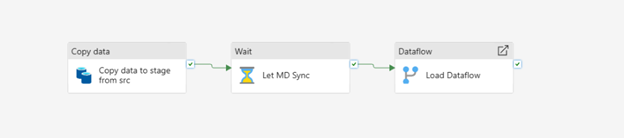
The simplest and most effective approach:
Add a Wait activity (30-120 seconds) after the Dataflow before downstream steps.
This allows metadata sync to complete.
ii. Validate Row Count Before Continuing
A more robust enterprise approach:
- Run a Notebook or SQL script
- Check expected row count
- Proceed only when data is complete
This creates a data validation gate.
iii. Avoid Immediate Read-After-Write
If possible:
Design pipelines so that:
Data write and data consumption do not happen in the same immediate execution chain.
Instead, trigger downstream pipelines separately.
iv. Force Metadata Refresh (Advanced)
In some scenarios, running a SQL endpoint query or table refresh step can help ensure metadata propagation before consumption.
Architecture Insight: Why Fabric Behaves This Way
Microsoft Fabric is built on distributed cloud components designed for scalability and performance.
Because of this:
- Storage layer and compute layer operate independently
- Metadata propagation is asynchronous
- Short delays are expected under heavy workloads
This is normal behavior in modern lakehouse architectures.
Production Design Recommendation
For enterprise-grade reliability:
Always include a stabilization step after Dataflow writes before consuming Lakehouse tables.
This prevents intermittent partial data issues and improves pipeline predictability.
Key Takeaway
If your Fabric Dataflow:
- Loads partial data only on the first pipeline run
- Works perfectly on rerun
The most likely cause is Metadata Sync Delay (MD Sync).
It is not a bug in your logic, it is a timing behavior in the platform.
Final Thoughts
Understanding Fabric’s internal behavior helps avoid confusion and build more reliable data pipelines.
Small architectural adjustments like adding wait or validation steps can eliminate these issues completely.
If you found this helpful, consider sharing it with your team or community to help others troubleshoot similar Fabric scenarios.