How Easily Copy Tenant ID, Environment, and Session Details in Business Central (BC24)?
 By Hetal Tank
August 21, 2026
3 min read
By Hetal Tank
August 21, 2026
3 min read
Introduction
Microsoft Dynamics 365 Business Central 2024 release wave 1 (BC24) is now generally available, bringing several usability improvements that enhance day-to-day productivity. Along with major features, Microsoft has also introduced small but impactful enhancements that simplify support and troubleshooting tasks.
In this post, we’ll look at a new update in BC24 that allows users to quickly copy Microsoft Entra tenant ID, environment, and session details when reporting a problem. Although this enhancement is not yet documented in the official BC24 release plan, it is mentioned in What’s new: Boost your productivity with Business Central.
Business Value
When reporting issues to support teams, accurate system information is essential. This enhancement reduces manual effort and minimizes errors when sharing technical details.
Key benefits include:
- Faster and more accurate problem reporting
- Reduced manual copying and pasting
- Improved communication with support teams
- Less time spent gathering diagnostic information
Overall, this small update makes the support experience smoother and more efficient for both users and administrators.
Requirement
How to easily copy Entra tenant ID, environment, and session details when reporting a problem in Business Central?
Prerequisites
- Ensure you are using Microsoft Dynamics 365 Business Central 2024 release wave 1 (BC24) or later.
- You must have access to the Help & Support page in Business Central.
- For Business Central online, a paid subscription is required to access the Report a Problem section.
Comparison with Previous Versions
In Business Central 23.5 and earlier versions, users had to manually select and copy each piece of information from the Report a Problem section.
With BC24, this process is now streamlined into a single click—saving time and reducing errors.
Solution (Implementation Steps)
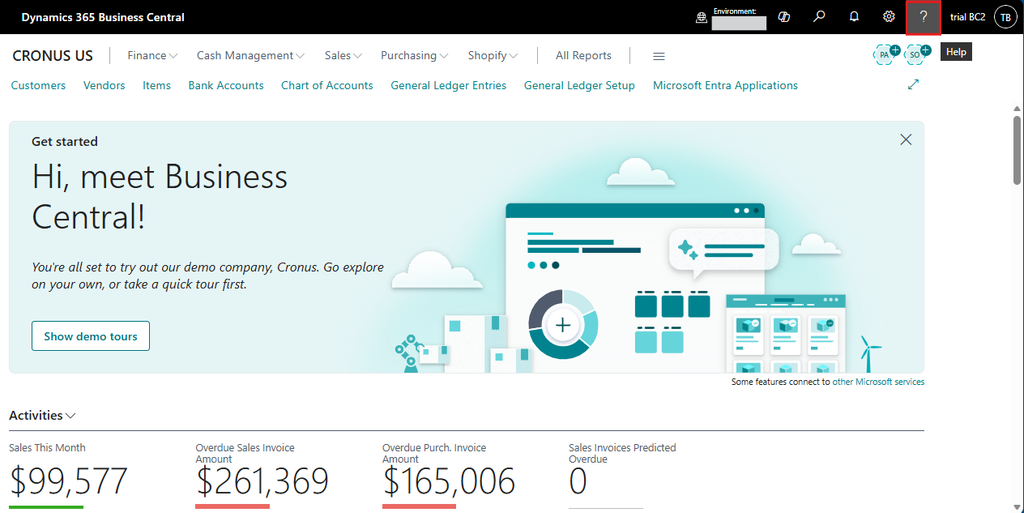
- Click on the top right corner Help ❓icon in Business Central to open the Help & Support pane.
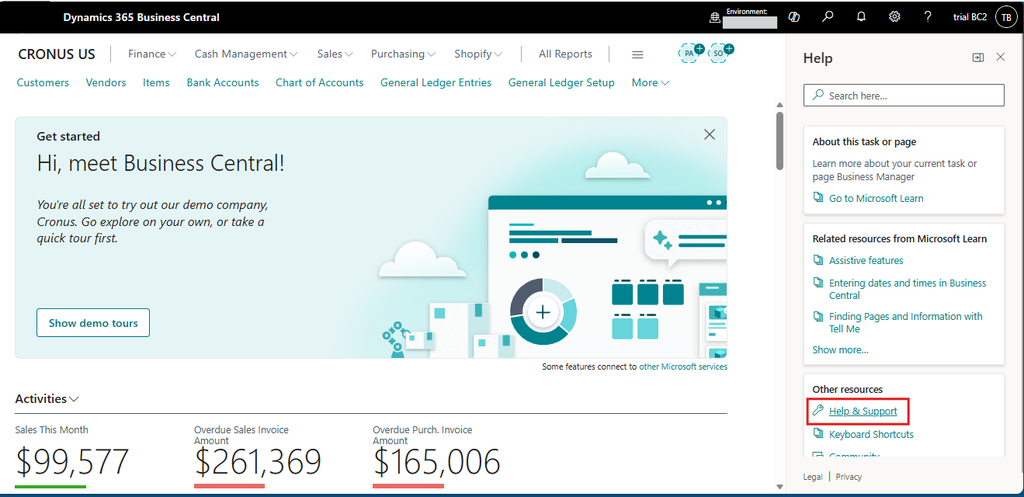
- From here, click on “Help & Support” and navigate to the Information page that provides access to useful links and support options.
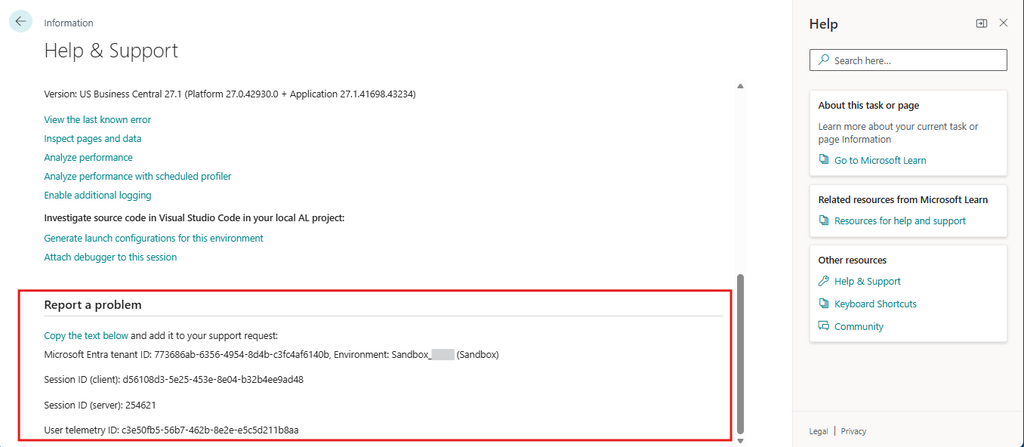
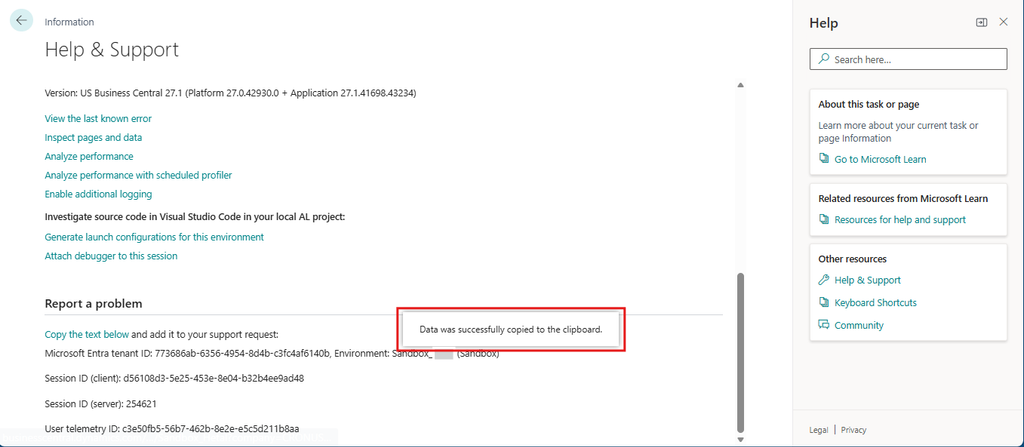
- On the Information page, scroll down and find the “Report a Problem” tab. This section displays important technical details, as listed below, which are required when raising a support request:
- Microsoft Entra tenant ID
- Environment name and type
- Session ID (Client)
- Session ID (Server)
- User telemetry ID
- In BC24, Microsoft has added a new action called “Copy the text below.” Click this action to instantly copy the information.
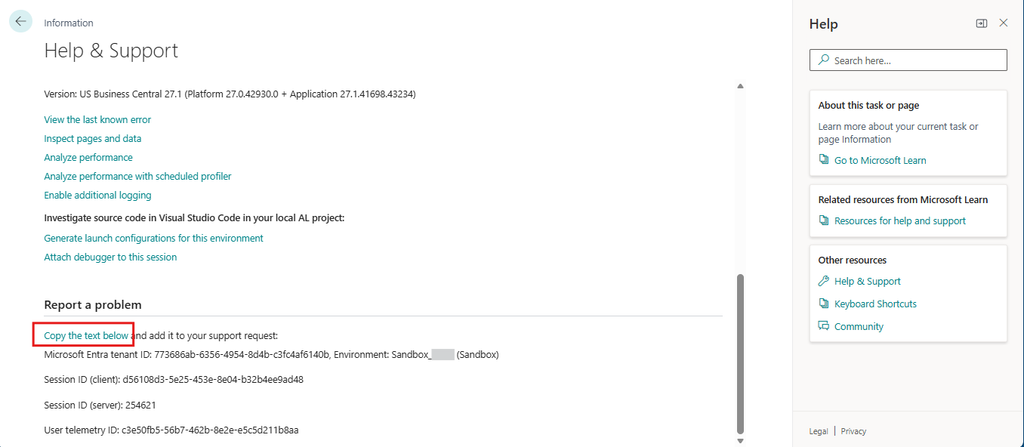
- This eliminates the need for manual copying. The system will display a successful message on the screen.
- Paste the copied information directly into your support ticket, email, or internal tracking system. This ensures that support teams receive complete and accurate diagnostic details.

Conclusion
This enhancement in Microsoft Dynamics 365 Business Central 2024 wave 1 may be small, but it makes a meaningful difference in everyday support scenarios. By allowing users to quickly copy tenant, environment, and session details with a single action, Microsoft has simplified problem reporting and improved overall productivity.