Home / Case Studies / Centralized Azure DevOps Analytics for Project Visibility and Delivery Insights

Infromation Technology

Centralized Azure DevOps Analytics for Project Visibility and Delivery Insights

A Power BI reporting solution that consolidates Azure DevOps project health, backlog management, work item tracking, and sprint performance to improve visibility, planning, and delivery decisions.

The Challenge

Overcoming Gaps in Project and Delivery Visibility

As Azure DevOps projects expanded, teams faced challenges monitoring project health, backlog readiness, work item progress, and sprint outcomes, limiting timely decision-making and delivery oversight.

Limited Visibility Teams lacked a consolidated view of project status, work item health, and delivery performance across multiple projects.
Backlog Complexity Identifying aging, high-priority, and dependent backlog items required significant effort and delayed planning activities.
Progress Tracking Monitoring work item movement through lifecycle stages was difficult, reducing visibility into execution progress.
Sprint Performance Teams struggled to compare sprint commitments against actual delivery and analyze carry-forward work effectively.
Objective

What We Set Out to Achieve

The objective was to provide project managers, team leads, and stakeholders with a centralized analytics platform for monitoring Azure DevOps project health, backlog readiness, work item progress, board activity, and sprint performance. The solution aimed to improve visibility into execution trends, identify bottlenecks, monitor priorities and dependencies, and support informed planning and delivery decisions.
Our Approach & Solution

Unified Azure DevOps Reporting and Delivery Analytics

The solution consolidated Azure DevOps delivery metrics into interactive Power BI dashboards, enabling users to monitor project health, backlog status, work progress, dependencies, and sprint performance from a single platform.

01
Executive Visibility
Developed an executive dashboard that provides a consolidated view of projects, work item distribution, project status, dependencies, issues, and delivery trends, helping stakeholders quickly assess overall project health and activity.
02
Backlog Management
Implemented backlog and planning analytics to track backlog volume, priorities, aging items, dependencies, and sprint readiness, enabling teams to prioritize initiatives and improve planning effectiveness.
03
Delivery Tracking
Delivered board and sprint analytics that monitor work item progression, sprint commitments, completed work, velocity, carry-forward items, and burndown trends to support execution and delivery management.
Project Insights
Detailed project-level reporting provides visibility into work item states, priorities, assignments, aging, completion timelines, and dependencies for deeper operational analysis.
Smart Indicators
Visual indicators and conditional formatting highlight critical metrics, trends, aging items, and potential risk areas that require immediate attention from stakeholders.
Results & Impact

Improved Delivery Visibility and Control

A unified analytics view enabled better monitoring of project execution, backlog readiness, work progress, and sprint delivery trends.

100%
Centralized Project Visibility
360°
Backlog Health Monitoring
RealT
Work Item Status Tracking
Agile
Sprint Performance Insights
Conclusion

The Bigger Picture

The Azure DevOps Analytics solution provides a comprehensive and centralized reporting framework for tracking project health, backlog management, work item progress, and sprint performance. By bringing together delivery metrics from across the Azure DevOps ecosystem, the solution enables stakeholders to gain greater visibility into project execution, monitor priorities and dependencies, and identify potential bottlenecks before they impact delivery outcomes.

Through dedicated dashboards for executive reporting, backlog planning, project-level analysis, board tracking, and sprint performance monitoring, teams can better understand delivery trends and make informed decisions throughout the project lifecycle. The solution reduces manual reporting effort, improves transparency across projects, and supports Agile delivery practices by aligning planning, execution, and performance measurement within a single analytics platform.

As a result, organizations can strengthen governance, improve delivery predictability, and drive more effective project management through data-driven insights.

Additional Details

Quick Start with your own data: Configuration Steps

Install Template App from here!

After installing the template app, follow these steps to connect the report to your Azure DevOps organization. 

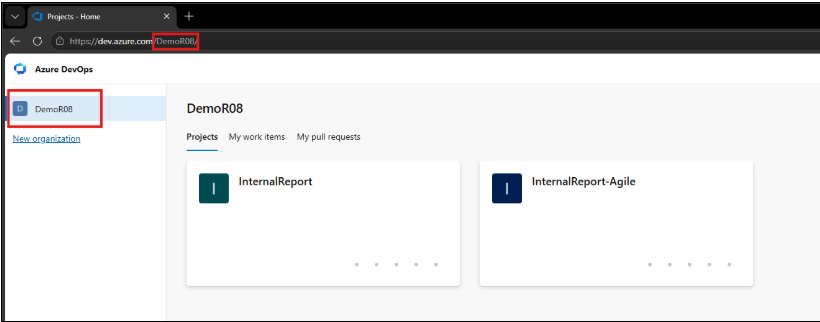
Step 1 – Enter Azure DevOps Organization Name 

  • Enter the Azure DevOps Organization Name in the provided parameter. 
  • Example: Organization Name: DemoR08

Note: Enter only the organization name, not the complete Azure DevOps URL. 

Step 2 – Authenticate Your Account 

  • Authenticate using an account that has the “Administrator” role in the Azure DevOps organization. 
  • Once authentication is completed, the report can connect to and retrieve data from the configured Azure DevOps organization. 
Ready to Transform Your Business with Data?
Connect with our team and let's build your intelligence story.
Chat on WhatsApp Call Us Now