Client based in – USA
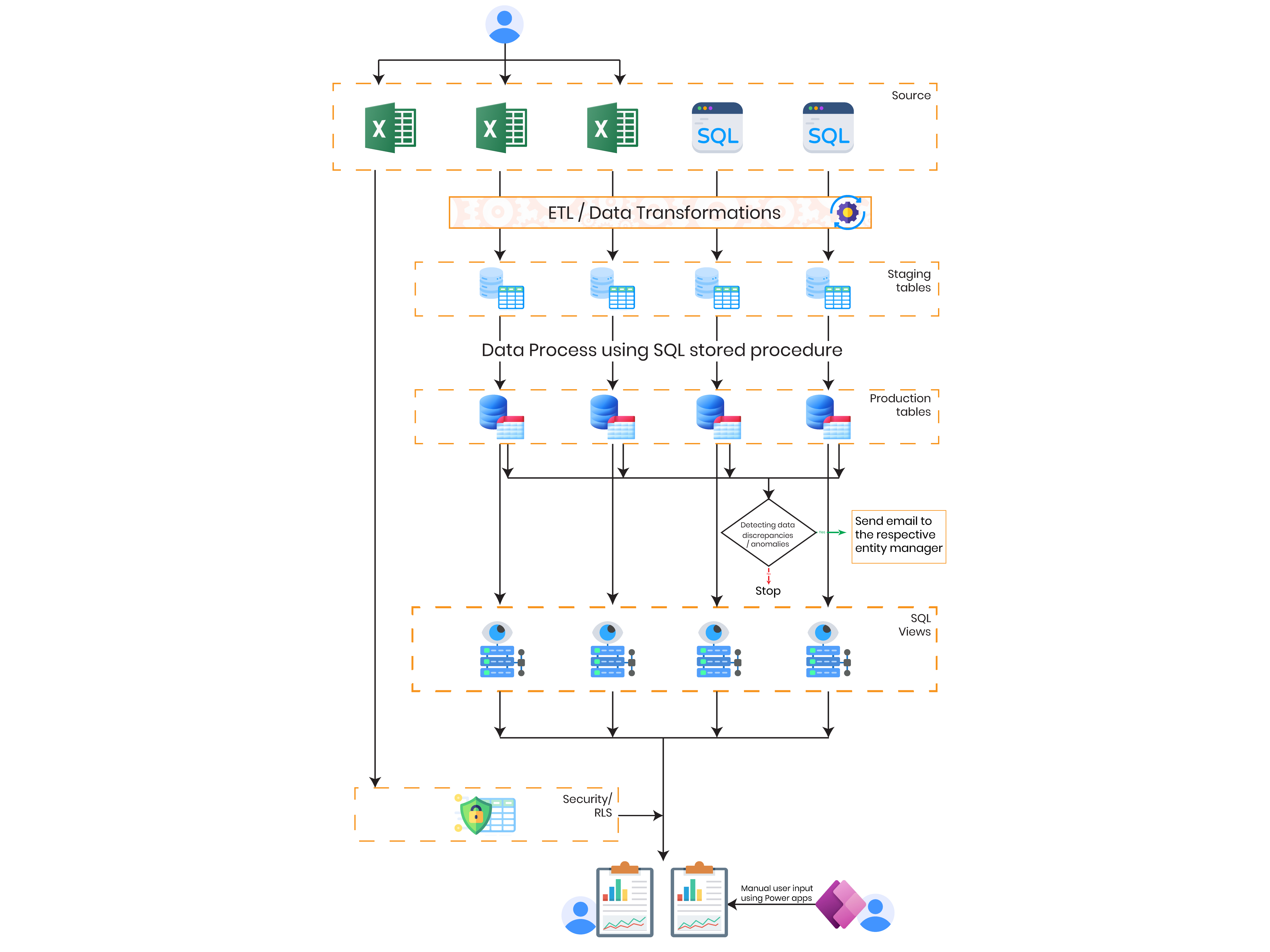
The image below depicts the same process we described earlier for converting the on-premises flows to the cloud:
.png)
Space Constraints and Reliability: On-premises systems require physical space for servers and infrastructure. Hardware failures or crashes can disrupt workflows, causing downtime and impacting critical processes. This reliance on physical hardware poses risks to continuity and system reliability. Dependency on Remote Connectivity: Users relying on the flow system need remote access to view or make changes, especially when away from their desktops or outside the office. This reliance on remote connections introduces logistical challenges and potential disruptions to workflow accessibility. System Maintenance: Regular system maintenance, including updating software versions and configuring settings, presents challenges. When software versions are updated, configurations need to be adjusted, and additional toolkits may be required. Moreover, deploying updates to production environments may involve transferring software to different systems, potentially causing compatibility issues or disruptions in workflow. Additionally, system downtime during software updates poses a significant challenge. After updating software versions, it is often necessary to restart the system, leading to downtime. During this period, workflows cannot be executed, causing delays in processes and impacting overall productivity.
Legacy on-premises infrastructure limited accessibility, increased maintenance effort, and caused operational disruptions due to hardware dependency and system downtime.
A cloud-native Azure architecture was implemented to automate data movement, centralize processing, validate business data, and provide proactive workflow monitoring.
The cloud migration improved workflow reliability, increased accessibility, reduced operational overhead, and established a scalable automation platform.
Migrating business workflows from on-premises infrastructure to Microsoft Azure enabled the organization to replace manual, infrastructure-dependent processes with a secure, scalable, and cloud-native solution. Azure Data Factory, Azure SQL Database, and Azure Logic Apps worked together to automate data integration, business validation, and operational notifications while reducing maintenance effort and improving system availability. The modernized platform established a resilient foundation that supports business growth, remote accessibility, and long-term operational efficiency.
Client based in – USA
The image below depicts the same process we described earlier for converting the on-premises flows to the cloud: