The Challenge
What Was Holding the Business Back?
Migrating CRM data between environments required preserving complex relationships, ensuring data quality, and minimizing business disruption.
Complex Migration
Migrating multiple CRM entities while maintaining relationships required a structured and reliable migration strategy.
Data Integrity
Preserving GUIDs, metadata, and custom fields was essential to maintain historical consistency across environments.
Validation Risks
The migration process required comprehensive validation to ensure data accuracy and relational integrity.
Development Issues
Metadata mismatches, truncation errors, and script configuration challenges increased migration complexity.
Objective
What We Set Out to Achieve
Execute a secure, one-time CRM data migration from the Sandbox environment to Production while preserving entity relationships, GUIDs, customizations, and data quality. The solution aimed to minimize downtime, simplify validation, and establish reusable migration processes for future deployments.
Our Approach & Solution
How We Delivered Results
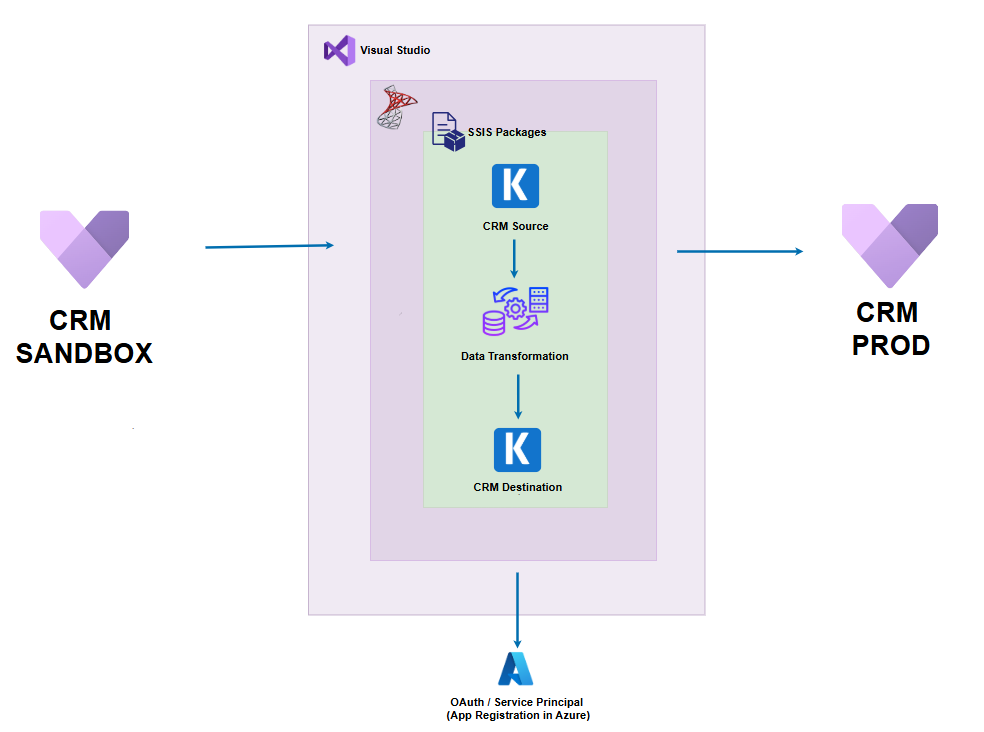
A structured SSIS and KingswaySoft migration framework was implemented to securely transfer CRM data while ensuring integrity, traceability, and reliable validation.
01
Environment Setup
Configured secure CRM connections for both Sandbox and Production environments using KingswaySoft connection managers and authenticated access.
02
Migration Planning
Defined migration scope, prioritized entity sequencing, and planned relationship-aware data loading to preserve business dependencies.
03
Data Migration
Developed SSIS packages to extract, transform, validate, and load CRM data using GUIDs and alternate keys for reliable synchronization.
04
Validation & Audit
Performed post-migration verification, captured detailed logs, validated record counts, and confirmed relational integrity across environments.
Results & Impact
The Outcome
The migration delivered accurate CRM data transfer with preserved relationships, reusable processes, and enterprise-grade reliability.
0 Loss
Critical Data Loss
1 Time
Full Data Migration
SSIS
Reusable Migration Packages
Conclusion
The Bigger Picture
The CRM migration solution successfully transferred business-critical data between Dynamics 365 environments while preserving relationships, metadata, and historical integrity. By leveraging SSIS and the KingswaySoft Integration Toolkit, the migration process combined structured planning, comprehensive validation, and robust error handling to deliver a reliable and scalable solution. The reusable migration framework also provides a strong foundation for future environment refreshes, upgrades, and enterprise data synchronization initiatives.
Additional Details
Migration Design & Approach: