How to Reopen Finished Production Orders in Microsoft Dynamics 365 Business Central
 By Inkey Solutions
July 10, 2026
3 min read
By Inkey Solutions
July 10, 2026
3 min read
Introduction:
Microsoft Dynamics 365 Business Central continues to evolve as a comprehensive business solution for manufacturers. With the 2025 Release Wave 1 update, a valuable new feature has been introduced—Reopen Finished Production Orders. This feature empowers users to correct errors in production orders even after they are marked as Finished, ensuring greater accuracy in inventory and cost reporting.
Business Value:
Previously, once a production order was finished in Business Central, no further changes could be made, even if a mistake was discovered. This created challenges if something was missed, like incorrect consumption data or missing item tracking. Now, with the ability to reopen a finished production order, manufacturers can fix errors and maintain the integrity of their inventory and costing information. This update significantly reduces manual adjustments, improves financial accuracy, and enhances inventory transparency.
Requirement:
How can you take advantage of the ability to reopen finished production orders in Business Central?
Prerequisites:
- Access to Microsoft Dynamics 365 Business Central.
- Permissions to view and manage production orders.
- The production order must meet the specific conditions mentioned below.
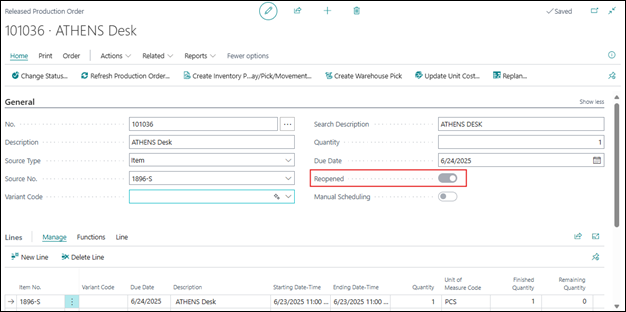
With this update, Microsoft has introduced the Reopen Boolean in Finished production Order pages.
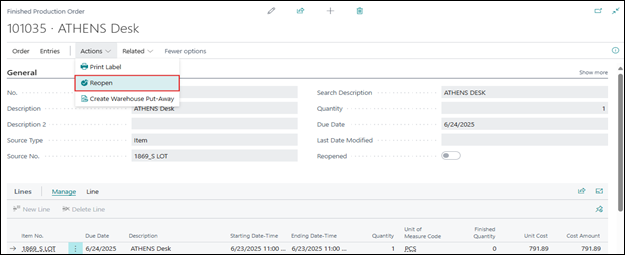
Solution (Implementation Steps):
Step 1: Locate the Finished Production Order
- Click on Search icon and search for “Finished Production Orders“. System will Open Finished Production Order list page.
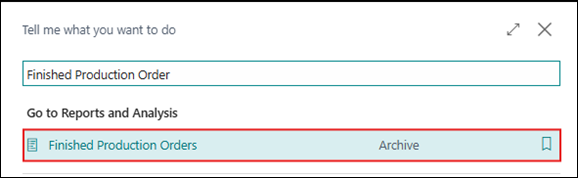
- From the Finished Production Order list page select the production order that needs correction.

Step 2: Reopen the Production Order
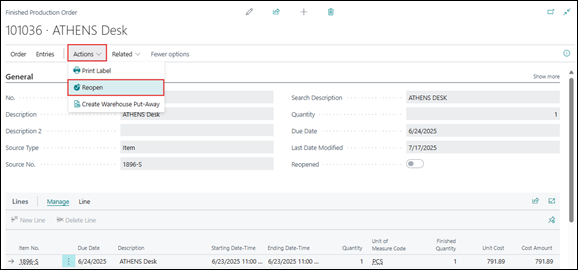
- To reopen a finished production order, click the Action -> Reopen option in the action bar above.
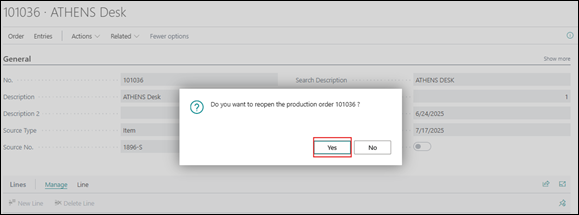
- A confirmation dialog will appear saying, “Do you want to reopen the production order?”. Choose Yes to proceed.
- The system will give Successful Message and ask to Open the released production order or not. Click on Yes.
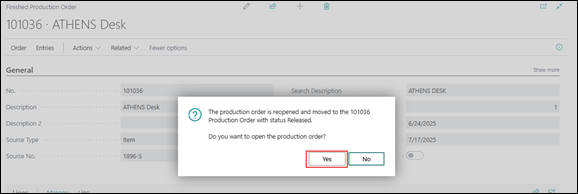
- If the user selects No, they must manually navigate to Released Production Orders by searching for it using the Tell Me search icon. If the user clicks Yes, the system navigates to the Released Production Orders page.
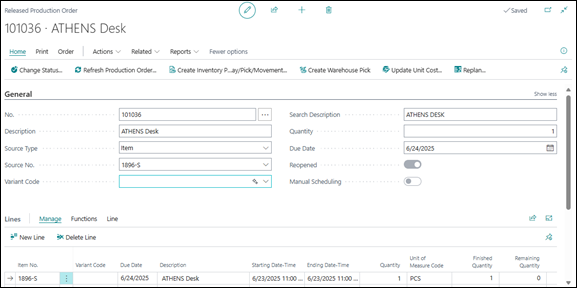
User can make the necessary adjustments—such as updating output entries, correcting consumption, or fixing item tracking issues and change the status of production order to finished.
Note: This action can only be done once per production order and is subject to specific rules to protect data integrity. On the page, Microsoft provides a Boolean field that indicates whether the order has been reopened or not.
Restrictions & Notes:
- You can reopen a finished production order only once.
- You can reopen only if the production order doesn’t have output or if cost WIP (Work in Progress) is already written off to the Inventory Adjustment account.
- This feature is designed to avoid multiple alterations that may compromise financial and operational accuracy.
Conclusion:
The Reopen Finished Production Orders feature in Microsoft Dynamics 365 Business Central 2025 Release Wave 1 provides much-needed flexibility for manufacturing teams. By allowing a one-time reopening of finished orders, businesses can correct mistakes related to consumption, output, or tracking. This ensures that inventory and cost data remain accurate without resorting to complex workarounds or manual corrections. It’s another step forward in making Business Central more responsive and user-friendly for real-world manufacturing scenarios.