Use of “Hide Company Bank Account” Field in Business Central General Ledger Setup
 By Inkey Solutions
July 7, 2026
3 min read
By Inkey Solutions
July 7, 2026
3 min read
Introduction
Microsoft Dynamics 365 Business Central continues to enhance standard functionality by adding configuration options that help organizations protect financial data and control system behavior. In Business Central 2025 release wave 1, Microsoft introduced a new setup option in General Ledger Setup called “Hide Company Bank Account.”
This setting allows businesses to control whether the Company Bank Account Code can be viewed or updated when working with posted sales documents. It is particularly helpful when bank account information should remain unchanged after posting to ensure consistency and compliance.
In this blog, we will explain how this standard feature works and how it can be used to manage posted sales invoices in Business Central.
Business Value
Hiding the Company Bank Account field on posted documents helps maintain financial integrity and minimizes the risk of unintended changes.
Key benefits include:
- Prevents accidental modification of bank account details after posting
- Improves control over posted financial transactions
- Supports audit readiness and compliance requirements
Overall, this feature helps finance teams maintain accurate and reliable posted documents.
Requirement
How to restrict updates to the Company Bank Account Code on posted sales invoices using General Ledger Setup in Microsoft Dynamics 365 Business Central?
Prerequisites
- Business Central environment must be on 2025 release wave 1 or later.
- User must have permission to access and modify General Ledger Setup.
- User must have access to posted sales documents and the Update Document action.
Behavior Before This Feature
In earlier versions of Business Central, users could update the Company Bank Account Code on posted sales invoices when using the Update Document action. There was no standard setup available to control the visibility of this field.
With the introduction of this feature, Microsoft has provided a centralized and standard way to manage this behavior without customization.
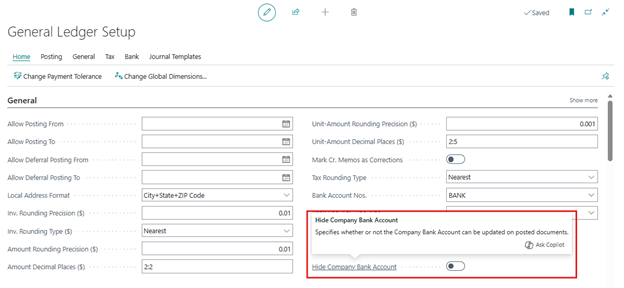
Solution (Implementation Steps)
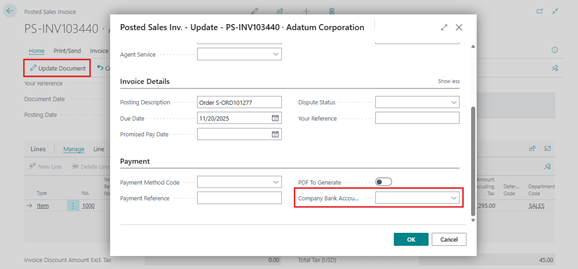
- Open the Posted Sales Invoices page and select any posted sales invoice. Click on Update Document to open the update page. When the Hide Company Bank Account option is disabled, the Company Bank Account Code field is visible.
- Posted Sales Invoice – Update page
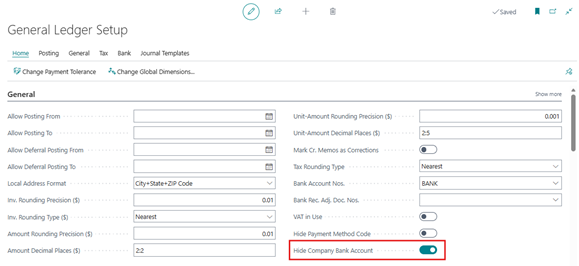
- To enable the Boolean, use the global Search icon to search for General Ledger Setup and open the corresponding page. On the General Ledger Setup page, locate the “Hide Company Bank Account” field under the General FastTab and turn the Boolean On.
- Go back to the Posted Sales Invoice – Update page. The Company Bank Account Code field is now hidden automatically by the system, without using personalization or design.
- Posted Sales Invoice – Update page
Notes
- This feature currently applies only to Posted Sales Invoices.
- Posted Purchase Invoices are not affected.
- Posted Service Invoices contain the field, but it is not controlled by this setup.
Conclusion
The Hide Company Bank Account option in Business Central 2025 wave 1 is a useful standard enhancement that helps organizations protect critical financial information on posted documents. By preventing changes to bank account details after posting, businesses can improve data accuracy, reduce risk, and strengthen financial controls.