Securing Databricks Notebooks: Moving Beyond Hard-Coded Passwords with Secret Scopes
 By Inkey Solutions
June 16, 2026
5 min read
By Inkey Solutions
June 16, 2026
5 min read
Modern data workflows frequently interact with external systems of databases, APIs, cloud storage, and third-party services. Each integration requires credentials such as passwords, tokens, or access keys. A common but risky practice is embedding these secrets directly into notebooks or scripts. As teams grow, this becomes a major security and maintenance problem.
Secret Scopes provide a secure, structured way to manage sensitive information without exposing it in code, logs, or version control.
The Problem: Hard-Coded Credentials in Data Projects
In collaborative analytics environments, developers often:
- Store passwords directly in notebooks
- Share tokens via chat or email
- Commit credentials to Git repositories
- Duplicate secrets across multiple scripts
These habits introduce risks such as unauthorized access, accidental leaks, and compliance violations. A centralized secret management mechanism separates code from credentials, which is a foundational security principle.
What Are Secret Scopes?
A Secret Scope is a secure container that stores key-value pairs of sensitive information.
Key → name of the secret (e.g., db-password)
Value → actual sensitive data
Instead of writing credentials in plain text, your notebook references the key, and the platform retrieves the value securely at runtime.
A simple analogy is a digital locker where your code knows the locker’s name, not the items inside it.
Why Secret Scopes Matter
- Security
Prevents accidental exposure of credentials in notebooks, logs, or screenshots. - Collaboration
Multiple users can run the same notebook without seeing each other’s passwords. - Maintainability
Updating a credential happens in one place instead of many notebooks. - Compliance & Auditing
Centralized storage and permissions help meet organizational security standards.
Types of Secret Scopes
- Platform-Backed Scopes
Secrets are stored internally within the workspace.
Best for: small to mid-size teams, faster setup, minimal external dependencies. - External Vault-Backed Scopes
Secrets are stored in an external cloud key vault and referenced by the workspace.
Best for: enterprises requiring centralized governance and cross-platform security policies.
Create Secret Scope
Before using secrets in notebooks, you first need to create a Secret Scope. A scope acts as a secure container that stores sensitive credentials as key-value pairs.
There are two common ways to create a Secret Scope:
- Using the Databricks UI
- Using the Databricks CLI
Both approaches are commonly used depending on whether you are creating scopes manually or automating infrastructure.
Among the available approaches, this guide covers the UI-based method for creating a Secret Scope for simplicity and ease of understanding.
Creating a Secret Scope Using the UI
Step 1: Open the Secret Scope Creation Page
Navigate to the following URL in your browser:
https://<your-databricks-workspace-url>#secrets/createScope
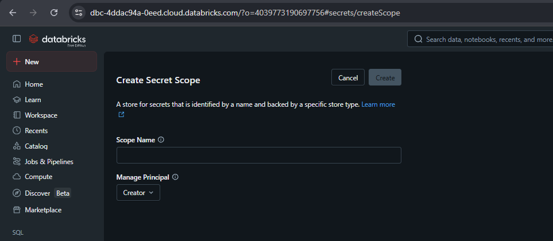
Step 2: Configure Scope Details
You will see a form with the following fields.
Scope Name
Provide a unique name for the scope.
Manage Principal
This setting determines who can manage the secret scope.
Options include:
- All Users – Any user in the workspace can manage the scope
- Creator – Only the creator can manage the scope
For production environments, restricting access is strongly recommended.
Step 3: Create the Scope
Click the Create button.
Once completed, the Secret Scope will be available in the workspace and ready to store secrets.
Access Control in Secret Scopes
Access control determines who can view or modify secrets. Poor permission design can negate all security benefits.
Permission Levels
- Read
Retrieve secret values only
Suitable for analysts and developers running notebooks - Write / Manage
Add, update, or delete secrets
Suitable for platform or DevOps engineers - Admin / Owner
Full control over scope and permissions
Reserved for workspace administrators
Access Control Best Practices
- Principle of Least Privilege
Grant only the minimum access required. Most users only need Read access. - Group-Based Permissions
Assign permissions to groups rather than individuals.
Benefits include easier onboarding/offboarding and consistent policy enforcement. - Environment Isolation
Never reuse production scopes in development or testing environments. - Regular Permission Audits
Review who has Manage or Admin rights to reduce over-privileged access.
Using Secrets in Notebooks
Instead of embedding credentials directly in code, notebooks request the secret at runtime. This ensures:
- No plaintext credentials in source code
- Safer notebook sharing
- Easier credential rotation
- Reduced exposure in logs or outputs
- The runtime injects the value securely without displaying it.
Best Practices
- Never hard-code credentials
- Separate scopes by environment and team
- Rotate secrets regularly
- Avoid logging or printing secret values
- Restrict administrative permissions
- Do not store non-sensitive configs in secret scopes
Common Mistakes to Avoid
- Creating one global scope for everyone
- Giving manage/admin access to too many users
- Forgetting to rotate credentials
- Treating secrets like normal configuration variables
- Sharing screenshots that expose secret values
Conclusion
Secret Scopes are more than a convenience feature; they are a core security mechanism for modern data engineering workflows. By separating credentials from code, teams gain stronger protection, easier maintenance, and safer collaboration.
For beginners, Secret Scopes introduce secure development habits. For intermediate users, they enable structured governance, automation, and scalable credential management. Implemented thoughtfully with proper creation strategy and access control, they significantly reduce operational risk while improving productivity.