Dynamically change the data type of Oracle Db and Migrate the data from Oracle to SQL using ADF
 By Inkey Solutions
August 22, 2025
5 min read
By Inkey Solutions
August 22, 2025
5 min read
Requirement:
While migrating tables from one database to another, there is a possibility of invalid data being inserted into columns that are not supported by their respective column data types. Consequently, errors may arise on the source side when attempting to migrate such data to another database.
The objective is to migrate tables from Oracle to SQL in a single run using Azure Data Factory (ADF). This entails transferring all tables present in Oracle to SQL seamlessly through a unified execution process.
Implementation:
SQL Table Creation: At the SQL level, a table named “[Dbo].[Oracle_Tbl_List_In_SQL]” has been created. This table encompasses the names of all tables present in the Oracle database. Its purpose is to facilitate the dynamic migration of all tables in a single run from Oracle to SQL.
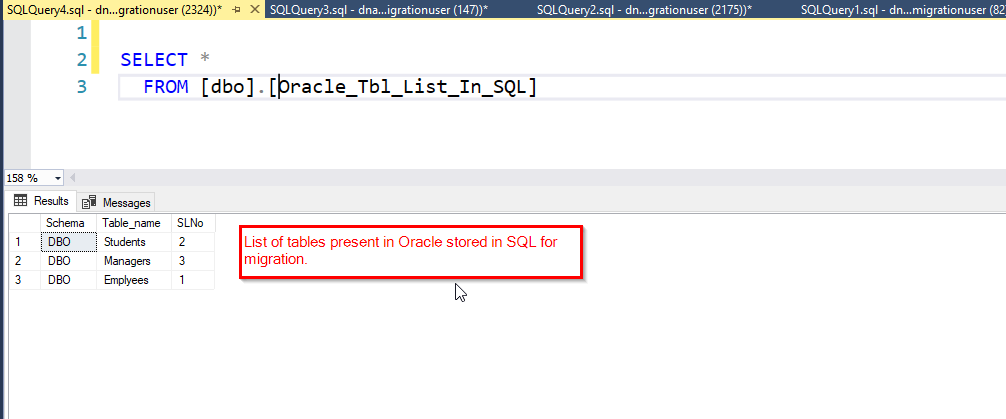
To fulfil the requirements, three pipelines have been devised in ADF:
Step 1:
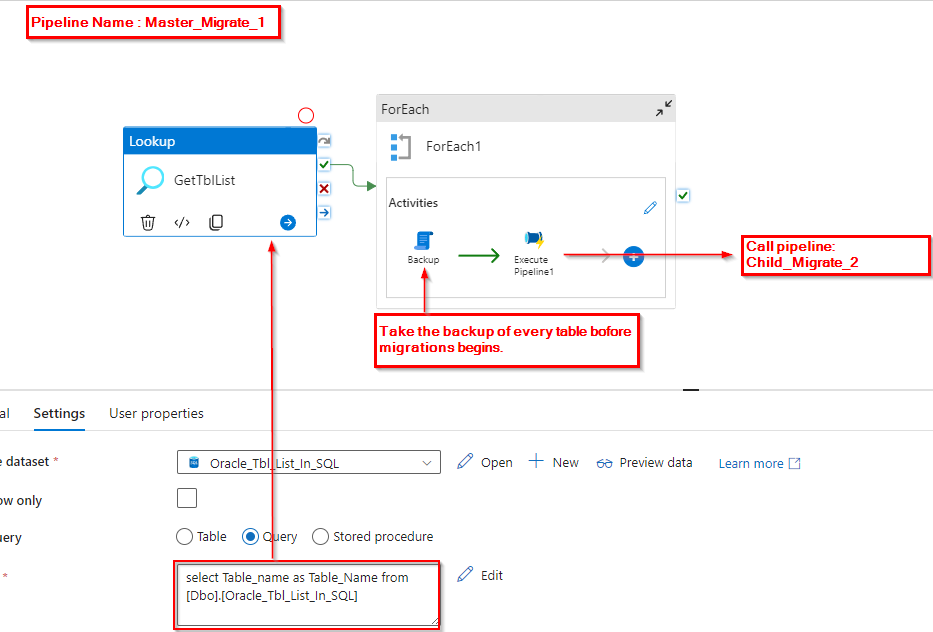
Master_Migrate_1: Pipeline 1 is designed to retrieve the list of tables earmarked for migration. Subsequently, it triggers the execution of the child pipeline, passing the table names as parameters for seamless processing.
Utilizing the Lookup activity, the workflow retrieves the list of tables existing in Oracle. Subsequently, it initiates the execution of a foreach loop activity, passing the table names one by one to a child pipeline. However, prior to executing the child pipeline, a crucial step is implemented: taking a backup of each table.
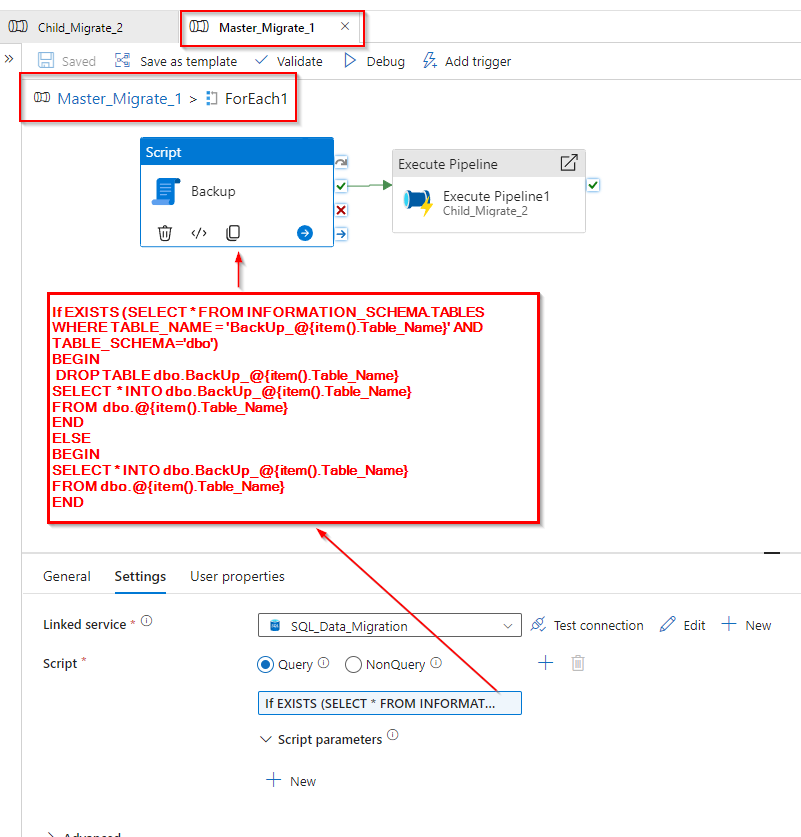
Step 2: The image below illustrates the activities within the foreach loop. Here, the backup of tables in SQL Server is performed using a script task.
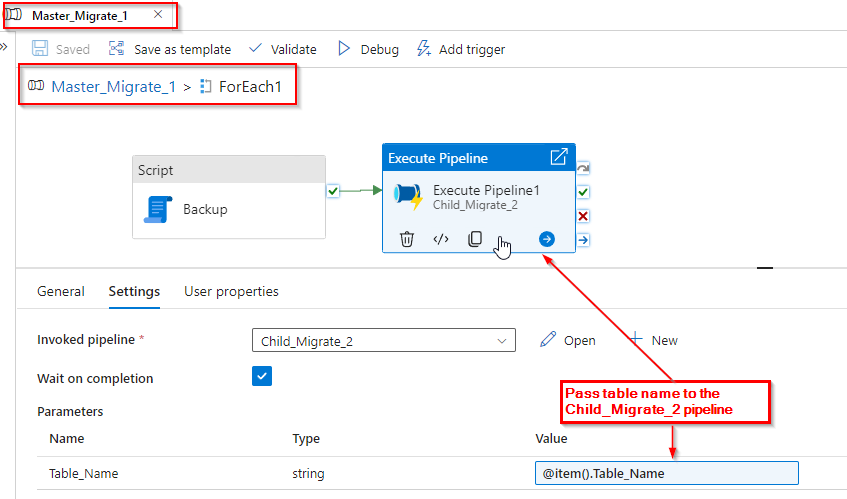
Now pass the name of the tables to its child pipeline “Child_Migrate_2”.
Step 3: To address the issue of invalid data present in date columns in Oracle, we employed the following approach. As depicted in the image below, we created a dynamic query that iterates through each table present in the Oracle database, fetching all columns dynamically. Additionally, this query dynamically converts the data type for columns where the data type is a date.
Query Used:
| WITH TBL AS ( SELECT CASE WHEN DATA_TYPE = ‘DATE’ THEN ‘TO_CHAR(‘ || COLUMN_NAME || ‘, ”YYYY-MM-DD HH24:MI:SS”) AS ‘ || COLUMN_NAME ELSE COLUMN_NAME END AS COLUMN_NAME, 1 AS rc FROM ALL_TAB_COLUMNS WHERE TABLE_NAME = ‘@{pipeline().parameters.Table_Name}’ ) SELECT LISTAGG(column_name, ‘,’) WITHIN GROUP (ORDER BY rc) AS concatenated_columns FROM TBL; |
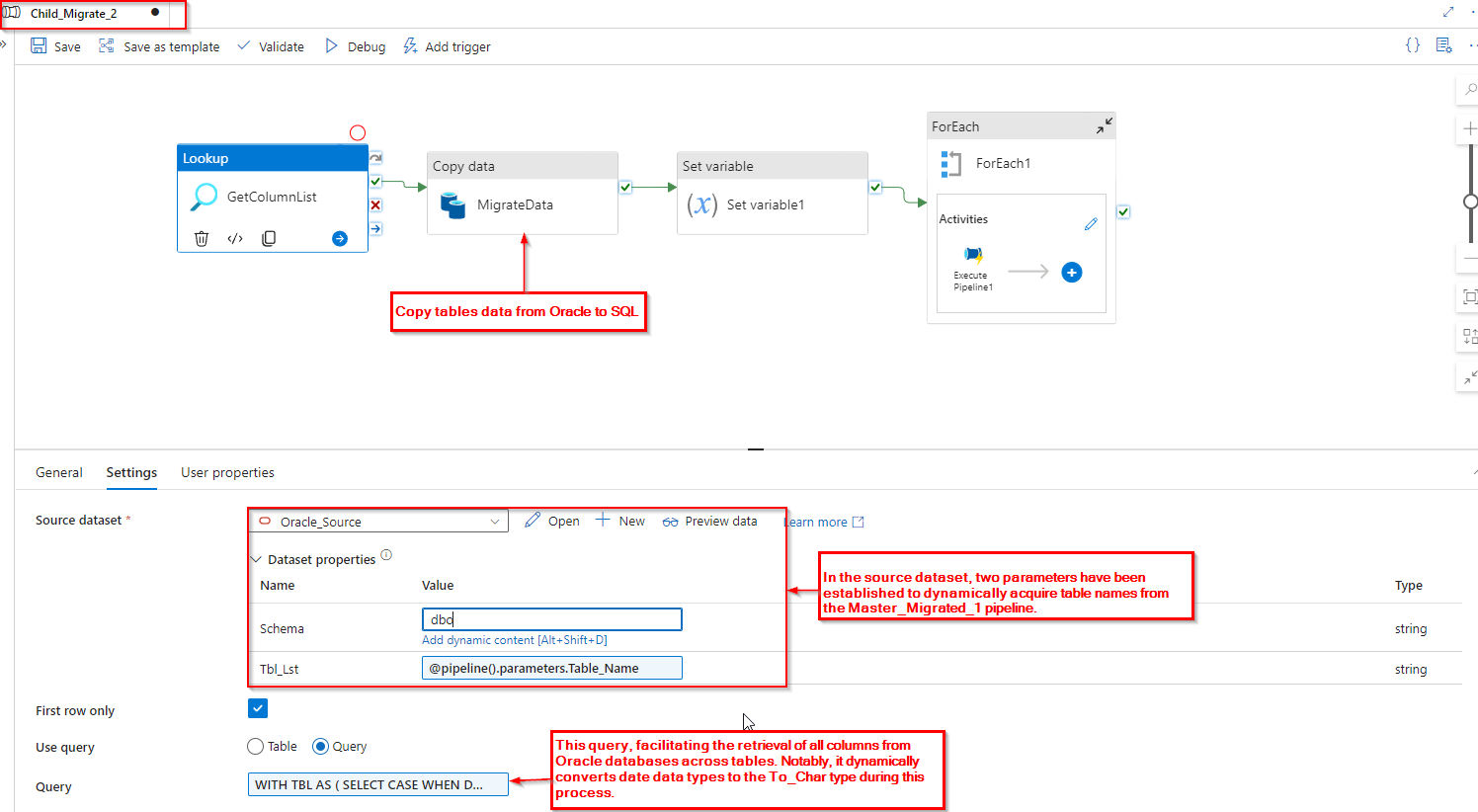
| Query Output Format :
“firstRow”: { “CONCATENATED_COLUMNS”: “ENTITY_CODE,LOCATION,TO_CHAR(COUNT_DATE, ‘YYYY-MM-DD HH24:MI:SS’) AS COUNT_DATE,NAME” }
|
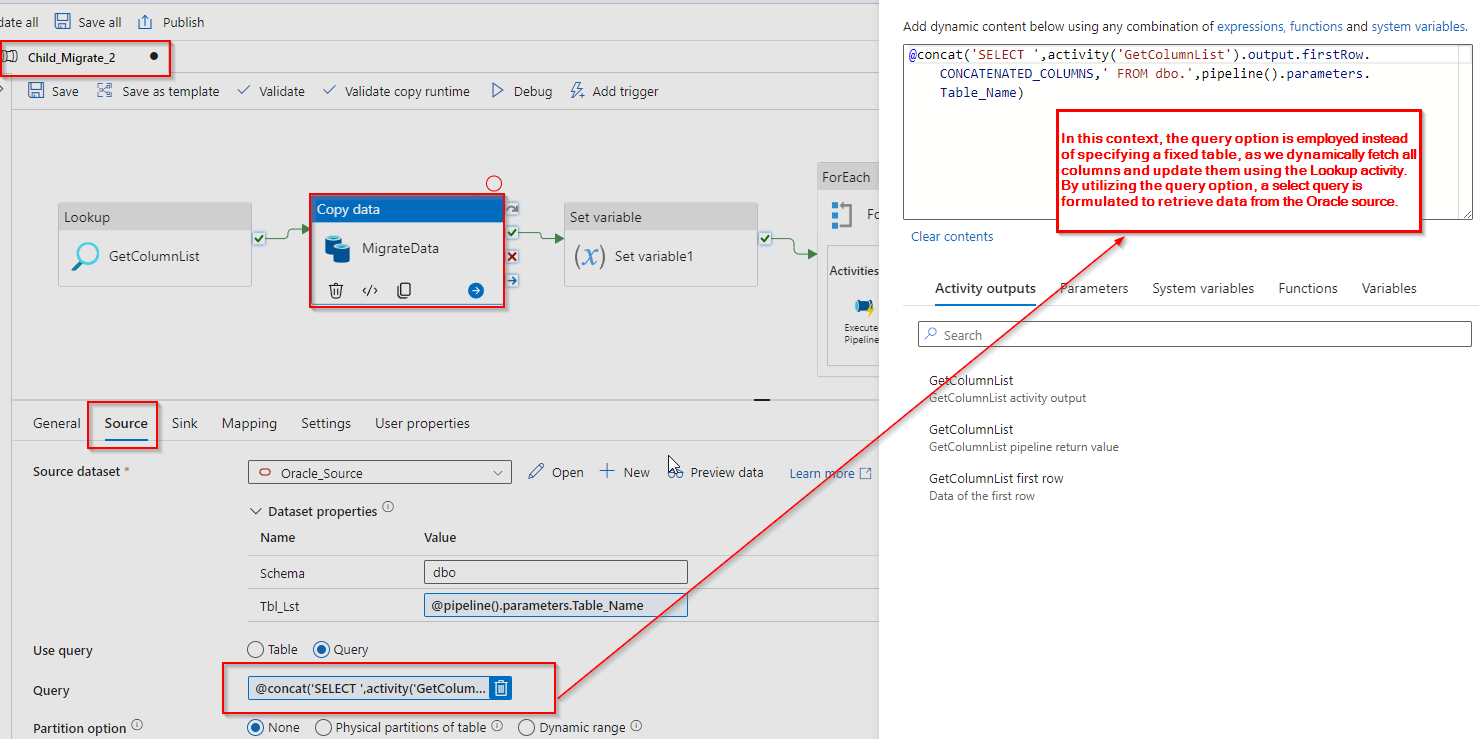
Step 4: Incorporate the output of the loop activity into the source query option of the copy data activity which will make the query as below:
| “oracleReaderQuery”: “SELECT ENTITY_CODE,LOCATION,TO_CHAR(COUNT_DATE, ‘YYYY-MM-DD HH24:MI:SS’) AS COUNT_DATE,NAME FROM DBO.TBL”, |
Source:
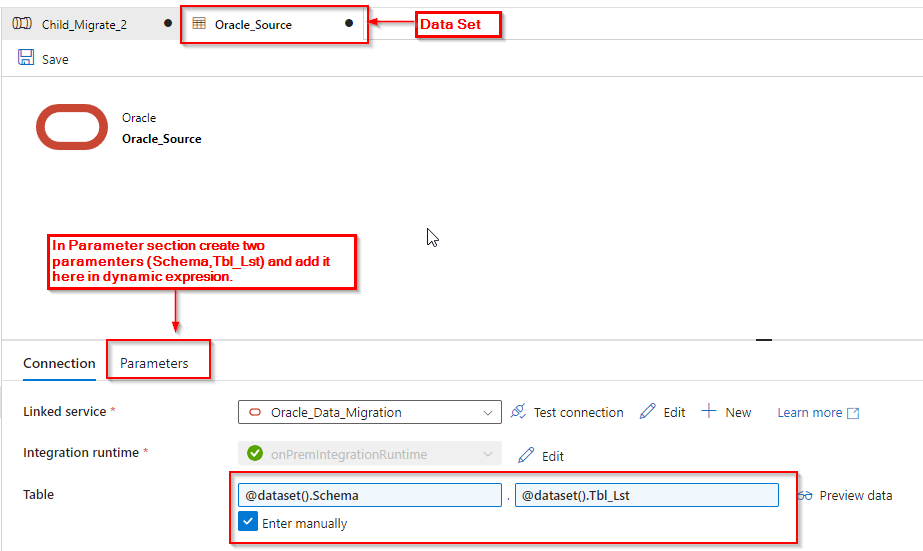
Source Dataset:
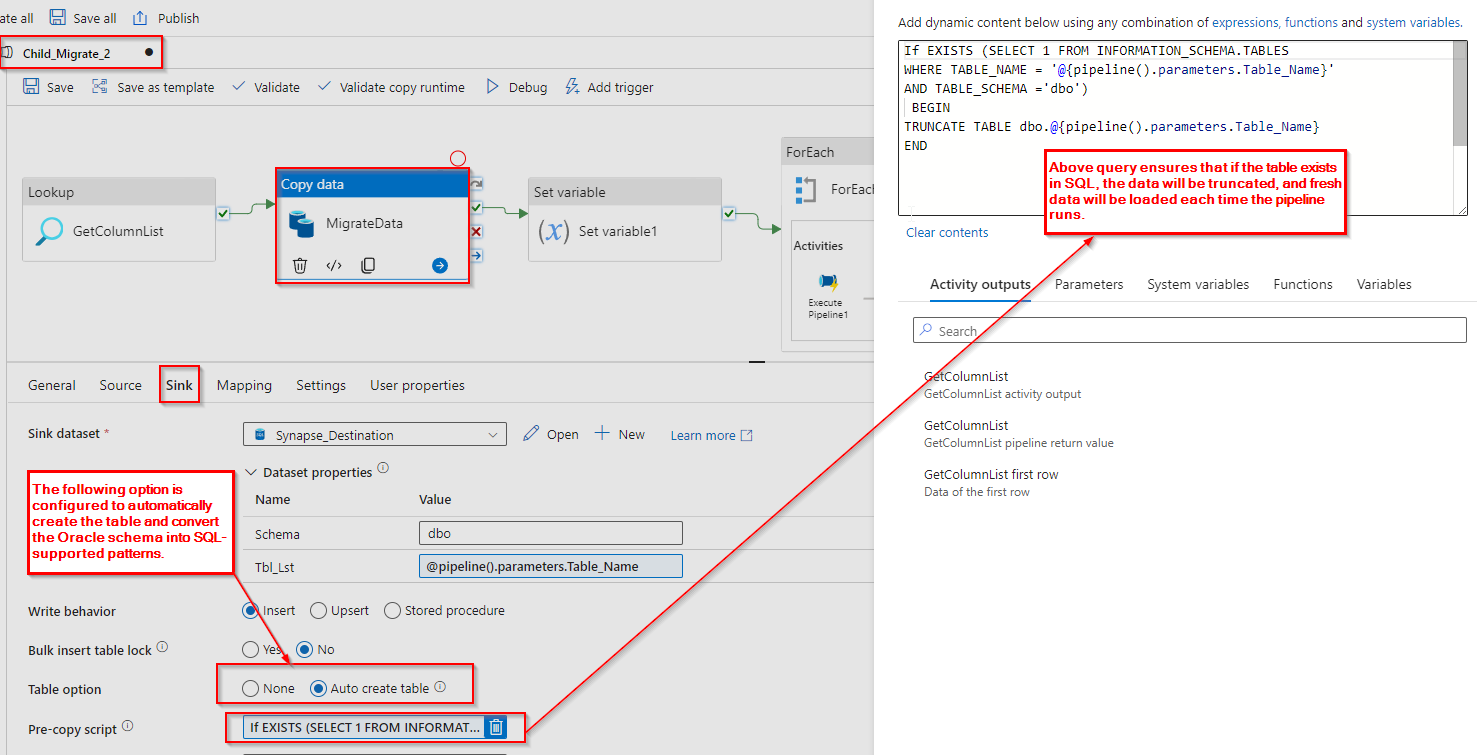
Sink:
Sink Dataset:
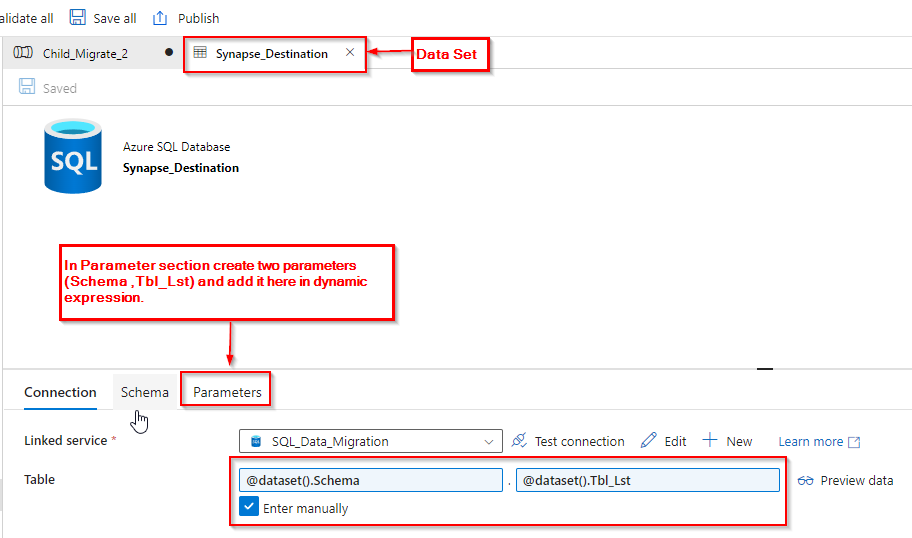
Step 5: After copying data from Oracle to SQL, we need to update the records in SQL tables where the date data type is present. In Oracle, there might be incorrect data in the date columns, so we convert them to string using “TO_CHAR”. Consequently, any invalid dates are represented as “0000-00-00 00:00:00” and are inserted into the SQL table.
However, identifying the columns with date data types poses a challenge. Since we converted them to strings, the schema created in SQL uses the VARCHAR data type. It becomes difficult to discern which columns originally had date data types, especially since other columns might also use VARCHAR.
To address this, we utilize the output of a lookup and split operation where “TO_CHAR” is found. This creates an array, and below is an example of the split output:
| “value”: [
” ENTITY_CODE,LOCATION “, “(COUNT_DATE, ‘YYYY-MM-DD HH24:MI:SS’) AS COUNT_DATE,NAME” ] |
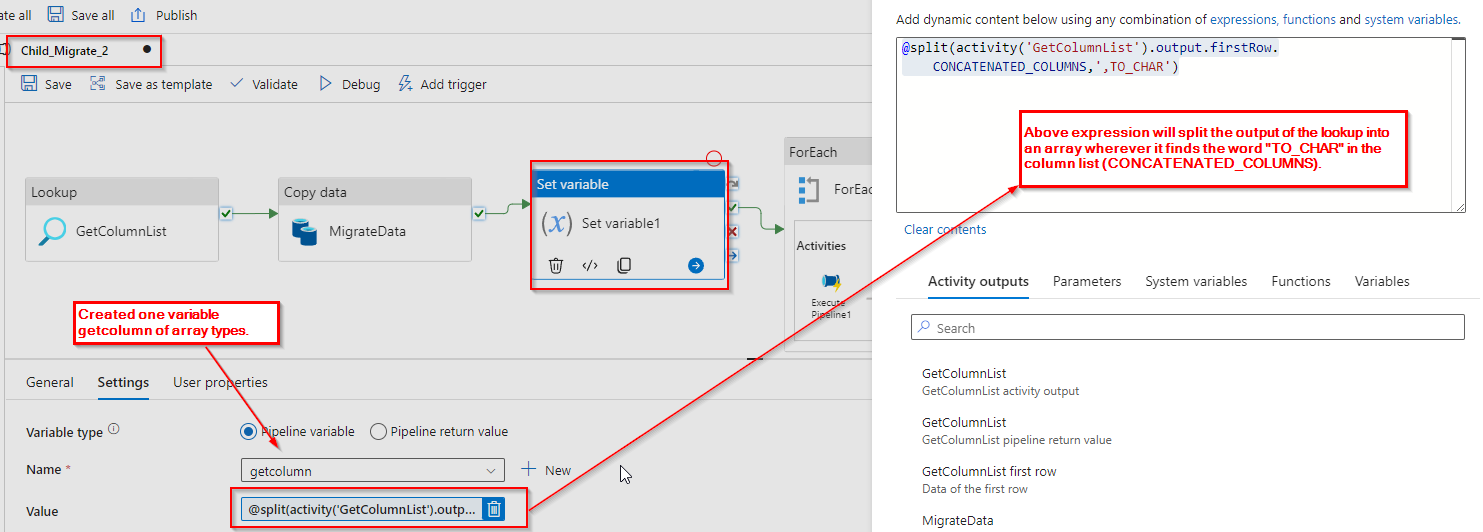
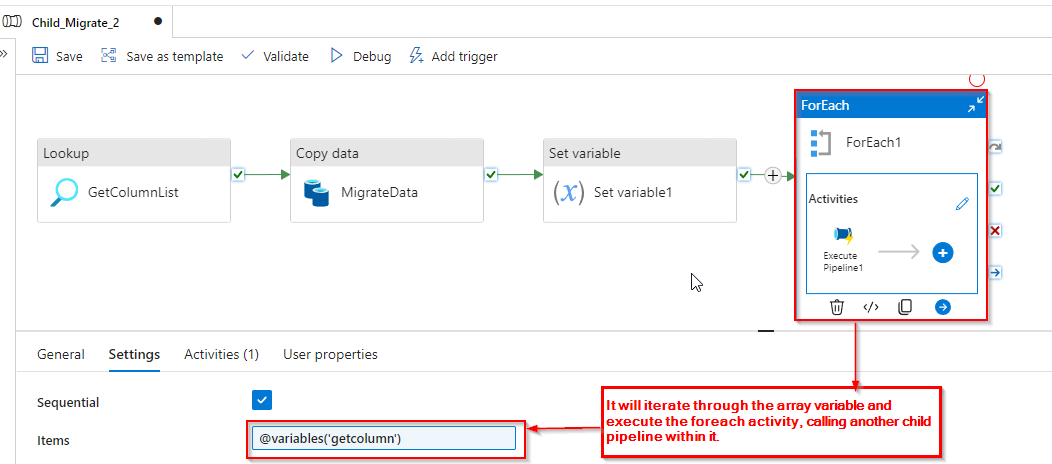
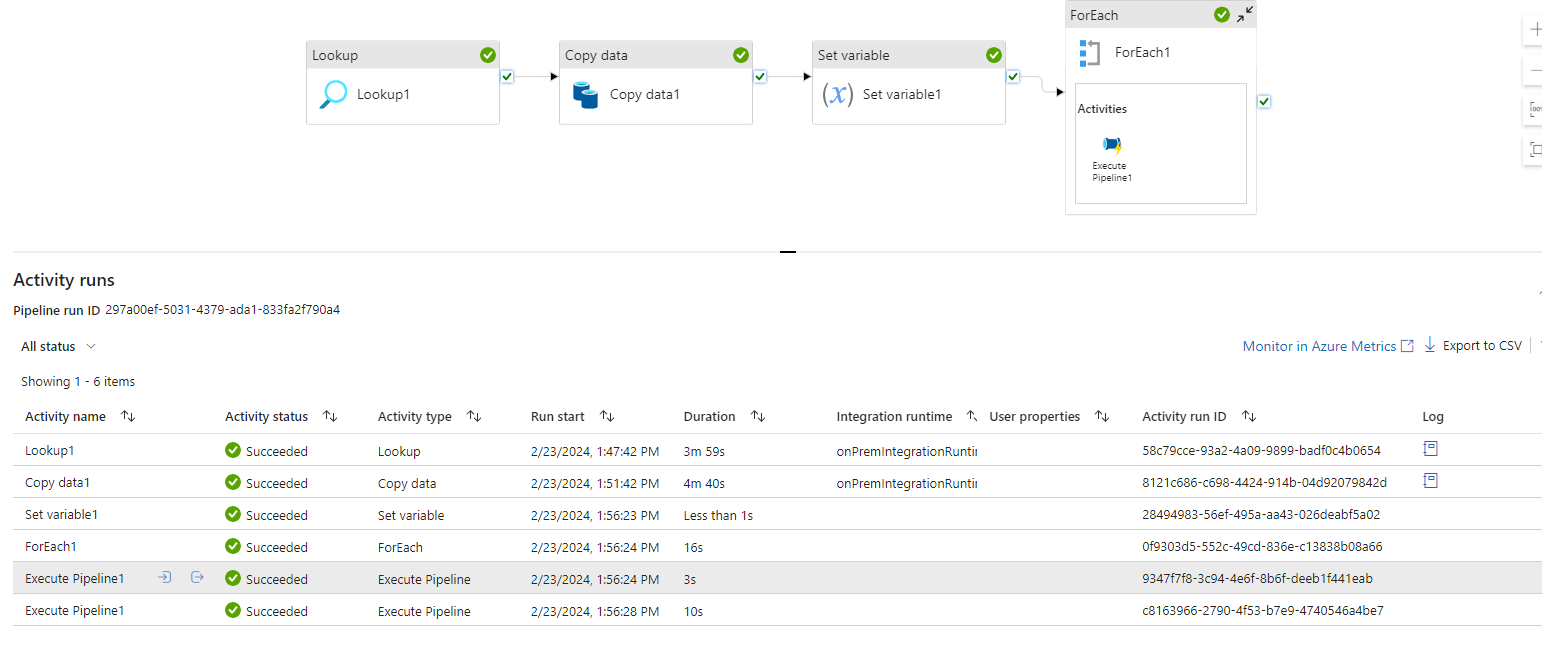
Step 6: It will iterate through the array variable and execute the foreach activity, calling another child pipeline within it. This iterative process ensures that each element of the array, identified based on the presence of “TO_CHAR” in the column list, is processed through the specified child pipeline.
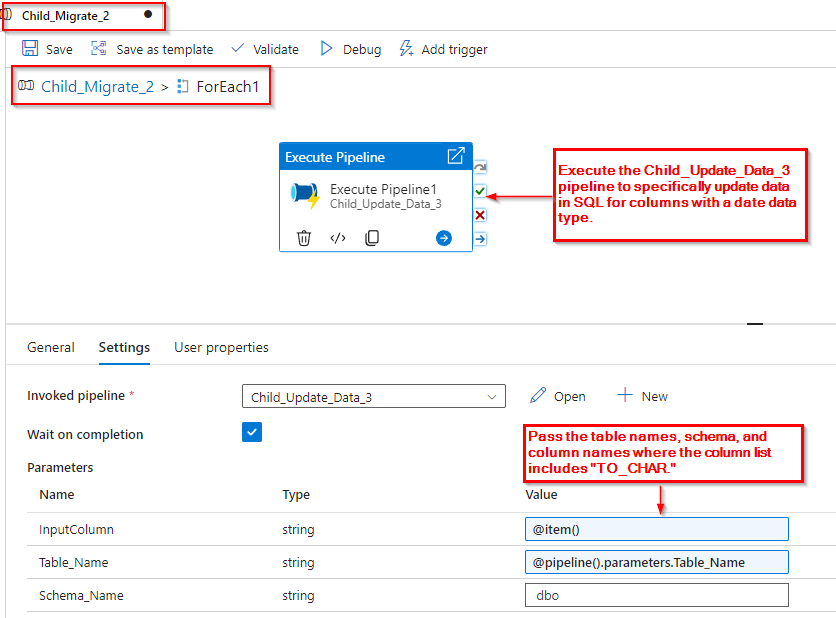
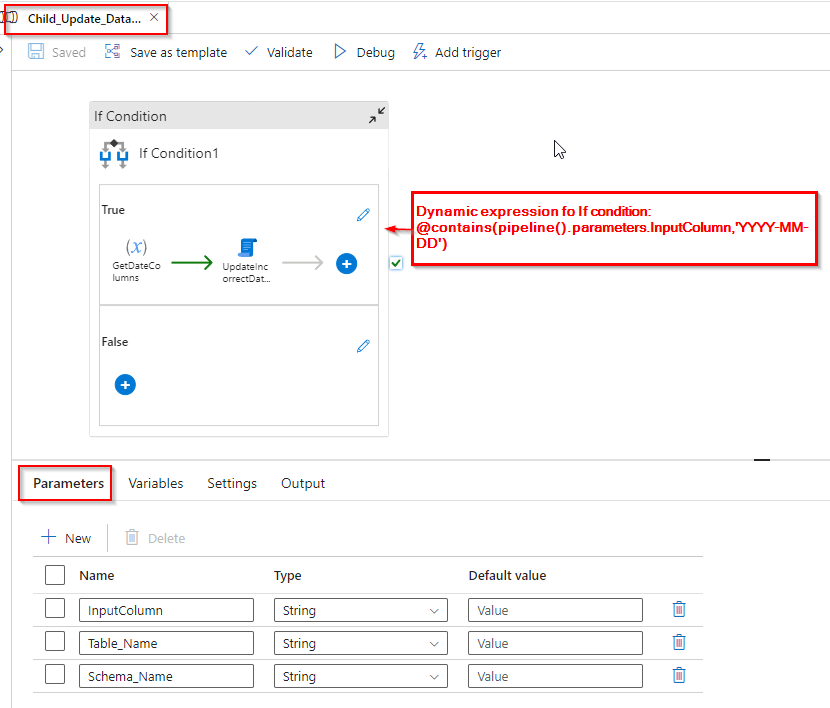
Step 7: The pipeline “Child_Update_Data_3” receives values from the “Child_Migrate_2” pipeline and verifies if the passed values contain the format “YYYY-MM-DD”. Only if this condition is met, the activities inside the pipeline are executed.
In Step 5, we obtained two items in array, and within one of them, we identified the date column containing dates in the “YYYY-MM-DD” format. For these specific columns, we need to update records in the SQL table
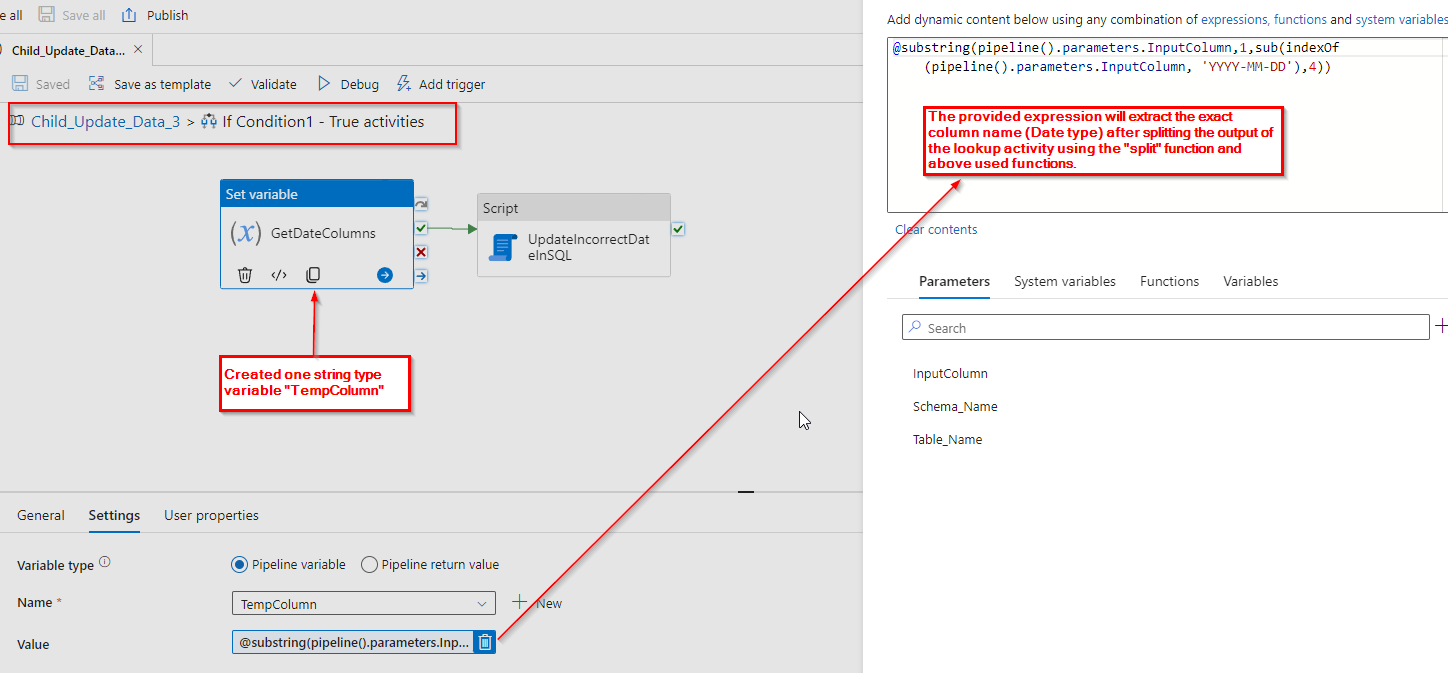
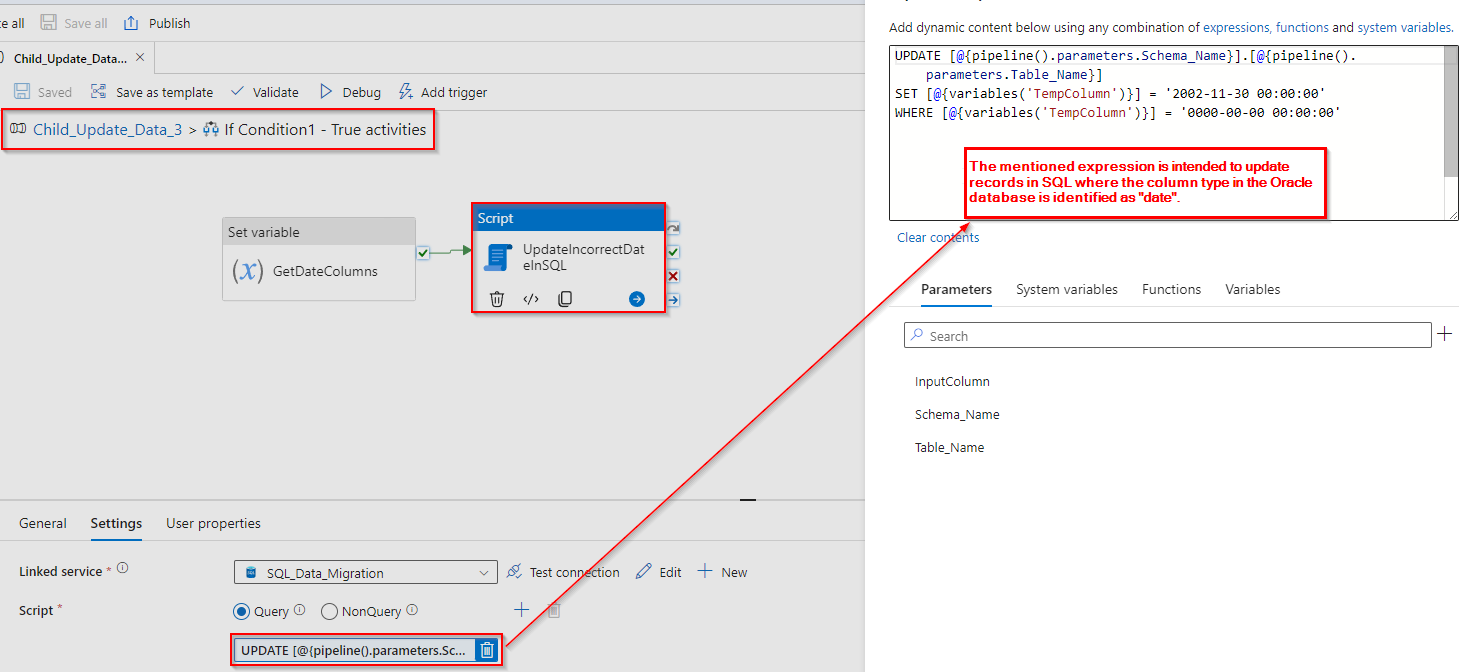
Step 8: Following the retrieval of column names, update the records within these columns in the SQL table with the desired date format, as illustrated in the image below.
Conclusion:
In addressing the challenge of managing invalid data within date columns during the migration process, we implemented a solution that employed dynamic queries and data type conversion. By constructing a sequence of meticulously crafted pipelines, we successfully navigated the migration journey. Our approach involved retrieving table names, adapting data types, transferring data from Oracle to SQL, and rectifying records to adhere to the desired date format.