Email Data Migration from CRM to SQL Server using Azure Data Factory
 By Inkey Solutions
November 25, 2025
5 min read
By Inkey Solutions
November 25, 2025
5 min read
Problem Statement
A growing enterprise needed to streamline its email data management. Email activity data, stored in the organization’s CRM system, was essential for compliance, customer service tracking, and business intelligence. However, they faced major challenges:
- Email data was only accessible through complex CRM APIs returning paginated JSON.
- There was no centralized repository for email data to enable structured analysis or audit.
- Manual exports were time-consuming and error prone.
- Business teams lacked visibility into communications and could not generate reports efficiently.
Key Business Requirements:
- Extract email activity data from CRM on a regular basis.
- Store raw JSON data securely for auditing.
- Parse and structure JSON data into SQL Server staging tables.
- Perform incremental loads into a final, report-ready table.
- Enable real-time reporting using Power BI.
Solution Overview
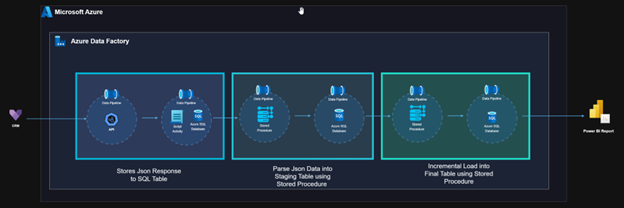
To meet these challenges, we developed a fully automated ETL solution using Azure Data Factory (ADF) integrated with Azure SQL Database. The design included multiple ADF pipelines, each responsible for a specific stage of the process, and leveraged stored procedures for data transformation and loading.
The architecture followed a linear processing model, not Medallion, ensuring simplicity, traceability, and high maintainability.
Architecture Diagram
Solution Components
1. Fetching and Storing Raw JSON from CRM API
- Component: ADF Data Pipeline
- Source: CRM REST API (Dynamics 365)
- Method: Web Activity + Copy Data Activity
- Authentication: Azure App Registration (OAuth 2.0)
- Pagination Handling: @odata.nextLink logic implemented
- Target: Raw JSON responses inserted into a dedicated table in Azure SQL Database
Purpose: Preserve raw, untouched API data for traceability and historical audit.
2. Parsing JSON into Staging Table
- Component: ADF Data Pipeline
- Activity: Execute SQL Stored Procedure
- Logic Inside SP:
- Read raw JSON data from the previously loaded table.
- Use OPENJSON() with WITH clause to extract nested fields (e.g., from, to, regardingObjectId).
- Insert parsed records into the Staging_Email
- Handle data type conversions, null values, and mapping.
Purpose: Convert semi-structured JSON into normalized, structured relational format.
3. Incremental Load into Final Table
- Component: ADF Data Pipeline
- Activity: Execute SQL Stored Procedurefcv
- Logic Inside SP:
- Identify new or updated email records by comparing EmailID and ModifiedOn.
- Insert new records and update modified records into Final_Email
- Maintain audit columns such as CreatedOn, ModifiedOn, ProcessedDate.
Purpose: Ensure the Final_Email table is always up-to-date and ready for downstream consumption.
4. Reporting via Power BI
- Tool: Power BI
- Connection: Azure SQL Database (Final_Email Table)
- Reports and Dashboards:
- Volume of emails by date and department.
- SLA breaches (e.g., reply delays).
- Top contacted customers and communication performance.
- Attachments analysis (optional add-on).
Purpose: Deliver near real-time insights to HR, operations, and support teams.
Challenges and Solutions
Challenge : API Response Size Limit in Web Activity
- Issue: While attempting to fetch CRM email data using ADF’s Web Activity, the API response size exceeded 4 MB, triggering the error:
Activity failed: Size of the response is more than allowed limit (4 MB). - Solution: To overcome this limitation, we switched to using Copy Data Activity, which is designed to handle larger payloads and efficiently stream data into SQL tables. This approach allowed us to:
- Bypass the 4 MB restriction.
- Write large JSON arrays directly to a staging table.
- Maintain pipeline reliability and performance.
Outcome:
We successfully stabilized the pipeline, and it now handles large volumes of JSON data reliably without any crashes or failures.
What We Did Well:
- Broke Things Down: We split the process into separate, modular ADF pipelines—one for extracting data, one for parsing it, and another for loading it. This made the system easier to manage and update.
- Clean Business Logic: Instead of spreading the logic across different parts of the system, we moved everything—parsing, transforming, deduplication—into well-organized stored procedures. This makes it easier to track changes and maintain the code.
- Built-in Monitoring: We added detailed logging so we can track each pipeline run, catch any errors, and even see which individual records failed. Everything gets stored in control tables, making debugging and analysis much simpler.
- Ready to Scale: The setup is flexible and can be extended easily. If we need to handle more CRM entities like Appointments or Tasks in the future, we can do it without major changes.
Results & Impact
Qualitative Benefits:
- Fully automated, end-to-end email data migration and reporting
- Raw JSON retained for transparency and traceability
- Eliminated manual API pulls and Excel processing
- Enhanced data consistency and audit-readiness
Quantitative Impact:
| Metric | Before | After | Improvement |
|---|---|---|---|
| Manual effort per week | 8+ hours | 0 hours | 100% reduced |
| Data availability latency | 3–5 days | Same-day | 80% improved |
| Report accuracy | Inconsistent | >99% accuracy | Vastly improved |
| Data audit failures | Frequent | Zero | 100% resolved |
Conclusion
This case study shows how to create an effective, automated email migration and reporting solution using Azure Data Factory in conjunction with Azure SQL Database and Power BI. The company was able to accomplish complete data control, visibility, and reporting automation without the need for complicated infrastructures by distributing tasks among specialized pipelines and utilizing stored procedures for transformation logic.
This design is scalable, secure, and easy to maintain—ready for future CRM data integrations.