ETL in Databricks
 By Inkey Solutions
November 7, 2025
5 min read
By Inkey Solutions
November 7, 2025
5 min read
Introduction
In the era of big data, transforming raw data into meaningful insights is crucial. Databricks, built on Apache Spark, provides a unified platform to perform ETL (Extract, Transform, Load) at scale. In this blog, we’ll explore what ETL is, how it works in Databricks, and walk through a hands-on practical example using a sample dataset.
What is ETL?
ETL stands for:
- Extract: Retrieve data from various sources (databases, APIs, files).
- Transform: Clean, filter, join, or reshape the data.
- Load: Store it into a target system.
Why Use Databricks for ETL?
- Built on Apache Spark: High-performance distributed computing.
- Delta Lake Support: ACID transactions and schema enforcement.
- Notebooks Interface: Easy to code, visualize, and collaborate.
- Unified Data Platform: Ideal for batch and real-time processing.
ETL in Databricks Using an API (Hands-On)
API We’ll Use:
We’ll use the “Fake Store API” – a public dummy API that returns fake product data in JSON format.
URL: https://fakestoreapi.com/products
STEP 1: Extract – Call API and Load into DataFrame
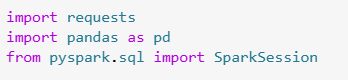
- requests: Python library for making HTTP requests.
- pandas: Used to convert the JSON into tabular format before converting to a Spark DataFrame.
- SparkSession: Entry point to use Spark APIs (though not used directly here, it’s needed if using Spark DataFrames).

- requests.get(…): Makes a GET call to the API.
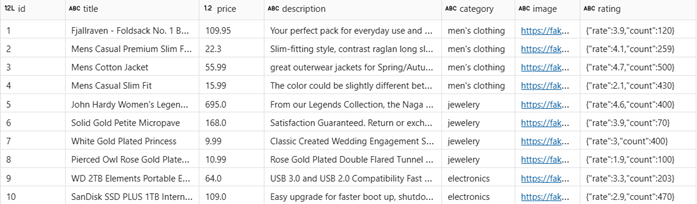
- The API https://fakestoreapi.com/products returns a JSON array of product objects (like [{…}, {…}]).
- .json(): Converts the response body (which is JSON) into a list of Python dictionaries.

- pd.DataFrame(data): Converts the list of dictionaries to a pandas DataFrame. Each product becomes a row, and dictionary keys become columns.
OUTPUT:
STEP 2: TRANSFORM – Clean & Enrich the Data

Step 2.1 Why this is needed:
- col() is a Spark function used to reference a column by name when performing transformations.
- Required for all the .withColumn(…) operations coming next.

Step 2.2 Converts Pandas → Spark:
- df_pd is a Pandas DataFrame (single-machine memory).
- createDataFrame(df_pd) converts it into a Spark DataFrame (df_raw), which:
- Can handle big data
- Allows distributed processing
- Can write to Delta tables, Parquet, etc.
- Now you’re in the world of PySpark.
Step 2.3 Flatten Nested Columns

- The API contains a nested rating field:
“rating”: { “rate”: 3.9, “count”: 120 } - withColumn(…): Extracts values from nested fields and adds them as new columns.
- .drop(“rating”): Removes the original nested field.
What’s happening:
- The rating column is a nested struct (like a dictionary).
- You extract two new columns:
- rating_score → from rate
- rating_count → from count
- Then you remove the original rating column using .drop(“rating”).
After this step, your data looks like this:

Step 2.4 Add a New Column (Derived Value)

What this does:
- Creates a new column price_with_tax
- Multiplies the original price by 18 (adds 18% tax)
- You now have:
- Original price
- Tax-inclusive price_with_tax
Step 2.5 Rename Columns

- Makes names more descriptive and analytics-friendly.

Step 2.6 Filter and Categorize
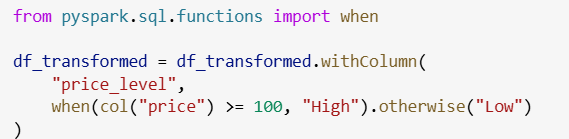
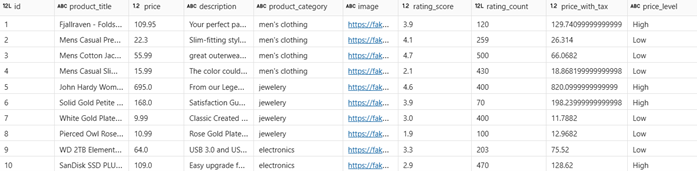
- Categorizes products into “High” or “Low” based on price.
- when(…).otherwise(…) is like SQL CASE WHEN.
OUTPUT:
Step 2.7 Handle Null Values
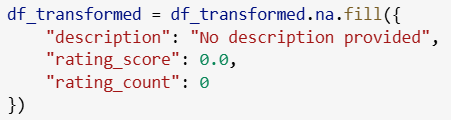
- Ensures nulls are replaced with defaults to prevent analytics issues.
STEP 3: LOAD – Save to Delta Table

- .format(“delta”): Saves using Delta Lake (supports ACID, schema evolution).
- .mode(“overwrite”): Replaces existing data at the path.
Register Delta Table (for SQL access)

ETL in Databricks vs. No-Code Tools (Comparison)
| Feature | Databricks (Code-Based ETL) | No-Code ETL Tools |
|---|---|---|
| User Interface | Requires coding (Python, SQL, PySpark) in notebooks | Drag-and-drop GUI, visual transformations |
| Flexibility | Very high – supports custom logic, API calls, conditions | Limited to predefined connectors and functions |
| Scalability | Enterprise-grade; handles big data via Spark | Depends on platform; some limited to moderate data volumes |
| Supported Sources | Any API, database, file, or real-time stream | Limited to supported connectors |
| Complex Logic (e.g., loops) | Fully programmable using Python, Spark, or SQL | Limited – hard to implement pagination, conditionals, or looping logic |
| Debugging/Testing | Granular, code-level debugging | Visual, step-by-step testing; limited code visibility |
| Monitoring | Custom logs or integration with Azure Monitor | Built-in UI monitoring, alerts, retry policies |
| Learning Curve | Steep for beginners | Easy for non-developers |
| Version Control | Git integration supported | Versioning may be limited or manual |
| Use Case Fit | Best for complex, large-scale, or unstructured ETL | Best for simple, structured, repeatable ETL tasks |
Pros of ETL in Databricks
| Advantage | Description |
|---|---|
| Full Flexibility | Use Python, SQL, Scala, or R to build custom logic, API connectors, or complex workflows. Ideal for advanced transformations, conditional logic, and dynamic handling. |
| Supports Complex Workflows | Easily implement loops, if-else, retry logic, pagination for APIs, joins, window functions, etc. |
| Scalable and Distributed | Runs on Apache Spark – optimized for large-scale data. Processes billions of rows across multiple nodes. |
| Connects to Anything | Can call any REST API, connect to databases, message queues, blob storage, etc., using Python libraries or Spark connectors. |
| Interactive Development | Notebooks allow step-by-step development, debugging, and visualization in real time. |
| Version Control & DevOps Friendly | Git integration for collaborative development and CI/CD pipelines. |
| ML & Advanced Analytics Ready | Seamlessly integrate machine learning models, SQL analytics, and visualization in the same environment. |
| Enterprise Security | Integration with Azure AD, data lake permissions, Unity Catalog, and data masking. |
Cons of ETL in Databricks
| Limitation | Description |
|---|---|
| Steeper Learning Curve | Requires knowledge of Python, PySpark, SQL, and Spark internals. Not ideal for business users or analysts without technical background. |
| Cost | Higher operational cost due to cluster startup time, compute resource pricing, and long-running jobs if not optimized. |
| Overkill for Simple Tasks | For basic CSV-to-table jobs, it can be too complex compared to no-code options like Dataflows or Pipelines. |
| Manual Job Orchestration (if not using Workflows) | While Workflows and Job APIs exist, scheduling and monitoring aren’t as intuitive as in low-code tools like Azure Data Factory or Microsoft Fabric Pipelines. |
| Delta Format Dependency | Optimized for Delta Lake; exporting to formats like CSV requires explicit conversion steps. |
| Debugging Can Be Tricky | Especially in distributed Spark jobs with complex joins or transformations, tracking errors across partitions can be difficult. |
| Cold Start Delays | Spark clusters take 1–3 minutes to start, which adds overhead for short-running ETL jobs. |