High Concurrency Session in Notebooks
 By Inkey Solutions
December 9, 2025
4 min read
By Inkey Solutions
December 9, 2025
4 min read
In today’s fast-paced data-driven world, real-time collaboration and efficient processing are essential. As more data engineers, analysts, and scientists work on shared platforms, the need for scalable and concurrent computing environments has never been more critical. That’s where High Concurrency Sessions in Notebooks step in.
Whether you’re using Microsoft Fabric, Databricks, Azure Synapse, or Jupyter-based platforms, enabling high concurrency allows you to maximize performance, ensure resource optimization, and support collaborative development at scale.
What is a High Concurrency Session?
A high concurrency session allows multiple users or processes to run notebook cells simultaneously on the same compute resource without stepping on each other’s toes.
Unlike a standard single-session notebook where one user’s actions might block others, high concurrency sessions ensure isolated, non-blocking execution, making them ideal for:
- Team-based development
- Automated data pipelines
- Interactive analytics dashboards
- Real-time data experimentation
Why Use High Concurrency Sessions?
- Scalability
- Handle multiple parallel executions efficiently without the need to spin up separate clusters for each user.
- Especially useful in environments with shared notebooks and scheduled jobs.
- Collaboration
- Enables multiple users to edit, run, and test code in the same notebook without interference.
- Ideal for team environments where engineers co-develop transformations and models.
- Performance
- Reduces overhead caused by spawning multiple sessions or kernels.
- Improves resource utilization by sharing the same compute engine.
- Cost Efficiency
- Fewer compute instances are needed since one session supports multiple users or threads.
- Optimized for multi-tenant usage without sacrificing performance.
How It Works (Behind the Scenes)
In a high concurrency notebook environment:
- The compute engine supports multi-threading or multi-session job queues.
- Each user or execution is given an isolated execution context (sandbox).
- Underlying Spark or kernel architecture handles resource allocation, memory, and thread safety.
- For platforms like Microsoft Fabric or Databricks, the engine intelligently manages the lifecycle of these sessions to avoid resource conflicts.
Practical Example: Running Concurrent Notebooks
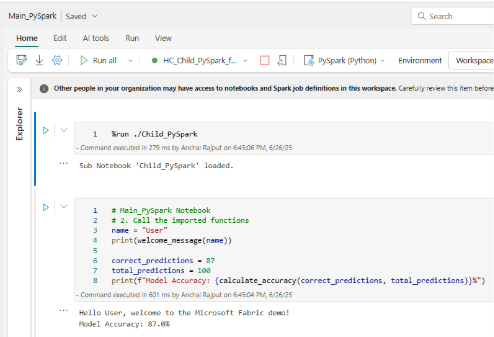
Let’s walk through a simple example that showcases how high concurrency works in Microsoft Fabric Notebooks using modular notebook architecture. This example uses a main notebook that runs a sub-notebook with user-defined functions. These notebooks can be executed by multiple users simultaneously, each in their own session, without interfering with others.
Notebook Structure:
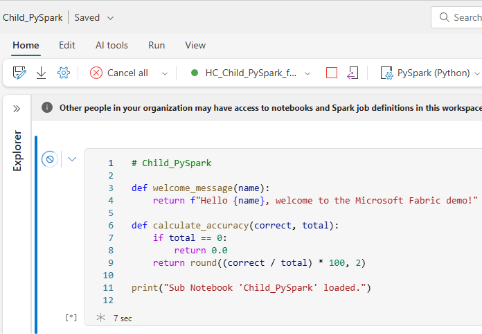
- Child_PySpark Notebook – Contains reusable functions.
- Main_PySpark Notebook – Imports and uses those functions.
Step i: Create a Sub-notebook (Child_PySpark)
This notebook defines utility functions to be used by other notebooks:
Step ii: Use Sub-notebook in Main_PySpark
What Happens in High Concurrency?
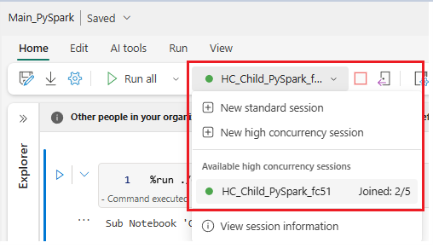
- Two users (or automated jobs) can open Main_PySpark at the same time.
- Each session gets its own isolated Spark context.
- There is no conflict even though both sessions call the same functions and run identical logic.
- Execution is sandboxed: each session manages its own memory, execution thread, and output logs.
- The results don’t overwrite or conflict unless explicitly written to shared locations.
Best Practices for Using High Concurrency
- Avoid global state: Do not use shared variables unless needed, use session-specific variables.
- Write to isolated paths: When testing, avoid writing to shared paths in Lakehouse or Blob storage.
- Use session identifiers: Add unique session/user IDs to table or file names to prevent overwrites.
- Monitor resource usage: Use built-in monitoring tools to observe memory and CPU utilization across sessions.
- Log separately: Maintain separate logs for each session/job for easier debugging.
How to Enable High Concurrency (Platform-specific Overview)
Microsoft Fabric:
- Automatically managed in Notebooks with shared Spark pools.
- Behind the scenes, Fabric optimizes Spark session usage for concurrency.
- You can monitor session activity via the Lakehouse Monitor.
Databricks:
- Use High Concurrency Clusters with multiple user permissions.
- Spark UI shows concurrent jobs under separate session IDs.
Common Pitfalls
- Resource contention: Too many parallel jobs can choke memory.
- Data overwrites: Not isolating output paths can corrupt results.
- Debugging complexity: Errors across sessions might be harder to trace.
Conclusion
High concurrency sessions in notebooks are more than a feature, they’re a paradigm shift for collaborative, scalable, and efficient data engineering and analytics.
By understanding how to leverage them correctly, teams can dramatically improve productivity, reduce infrastructure cost, and accelerate development cycles, all without sacrificing performance or control.