How to Autofill Contact Details with Copilot in Microsoft Dynamics 365 Business Central
 By WebSiteAdmin
August 25, 2026
4 min read
By WebSiteAdmin
August 25, 2026
4 min read
Introduction
Microsoft Dynamics 365 Business Central continues to enhance user productivity by embedding AI-driven assistance directly into everyday business processes. One of the key improvements available in the 2025 release wave 2 is the Autofill Contact Details with Copilot feature.
Entering customer and vendor contact information—such as addresses, phone numbers, and email details—can be repetitive and prone to errors. With this enhancement, Microsoft Copilot intelligently assists users by suggesting relevant contact details during data entry. By leveraging publicly available information, Copilot helps users complete records faster while maintaining accuracy and consistency.
Business Value
Auto filling contact details with Copilot significantly reduces the effort required to maintain accurate master data.
Organizations benefit through:
• Reduced manual data entry: Users no longer need to type or copy contact details repeatedly.
• Improved data accuracy: Suggestions are based on publicly available and relevant information.
• Increased productivity: Faster creation of customer and vendor records, especially for high-volume users.
For example, when creating a new vendor or customer, Copilot can automatically suggest the correct address, phone number, email, and website—allowing users to confirm and save instead of manually searching and entering the data.
Requirement
· How can users take advantage of Copilot to automatically suggest and fill contact details for customers and vendors in Business Central?
Prerequisites
• Access to Microsoft Dynamics 365 Business Central.
• Copilot enabled in the environment.
• Administrator permissions to manage Copilot & agent capabilities.
Solution (Implementation Overview)
Step 1: Enable Copilot Web Search
To allow Copilot to retrieve publicly available contact information, administrators must Enable Bing Search.
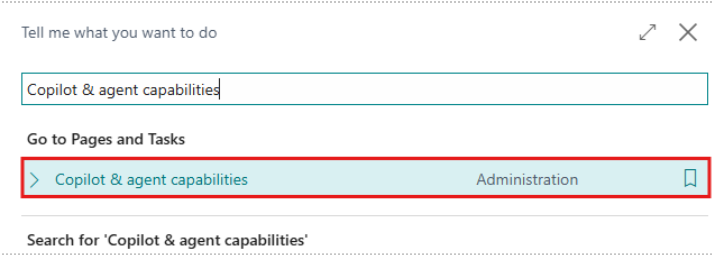
A. Click the global search icon in the top-right corner, search for” Copilot & agent capabilities”, and open the related link in Business Central.
B. On the Copilot & agent capabilities page, locate the “Enable Bing Search” toggle and turn it on to allow Copilot to access web-based information for autofill suggestions.
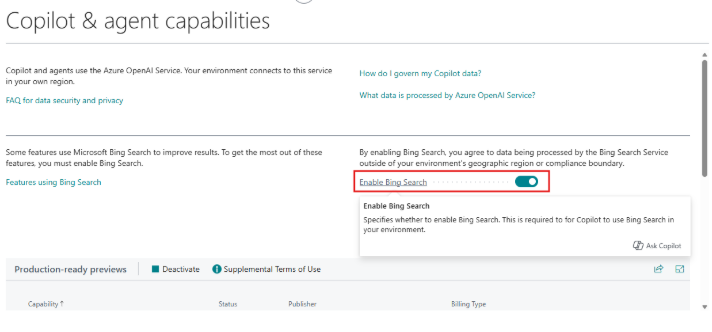
This step is mandatory for Copilot to provide address, phone, email, and website recommendations. Once toggle is enabled, Copilot works automatically in supported fields.
C. To create or edit a Customer or Vendor card in Business Central use the global search icon to open the Customer page, then either open an existing record or create a new one by clicking + New.
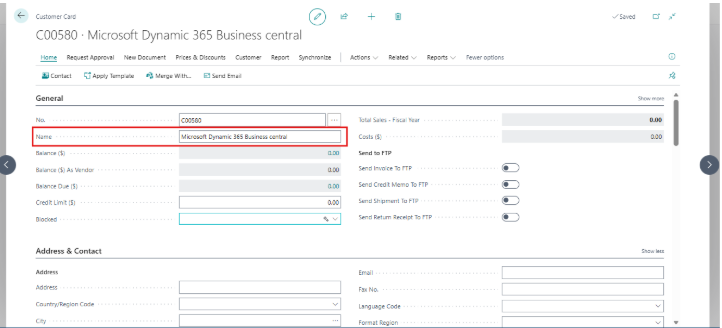
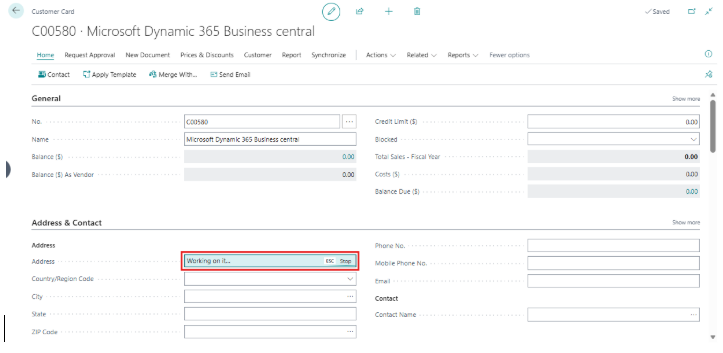
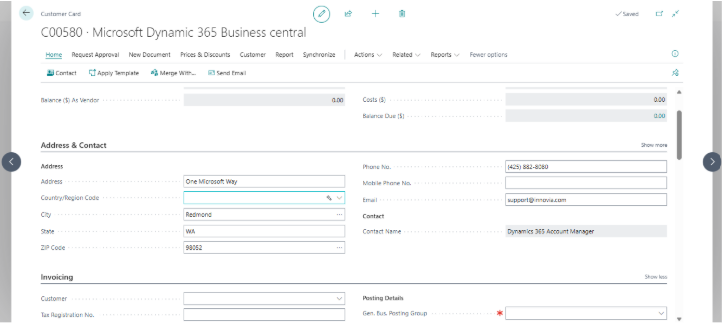
D. After entering the name, the user can click the autofill icon in any field they want the system to populate.
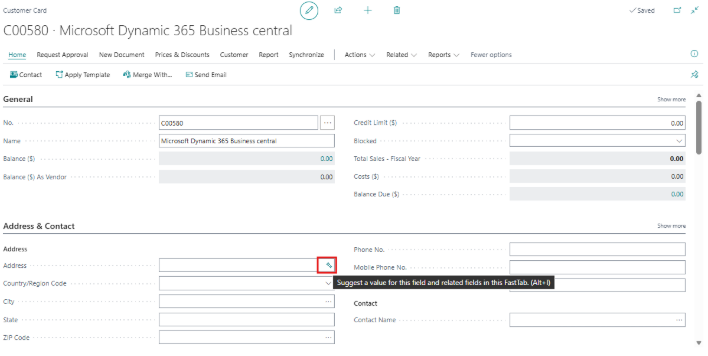
E. Copilot will then search the web for relevant information and automatically fill the fields it can identify, such as:
· Address
· Phone number
· Email address
· Website
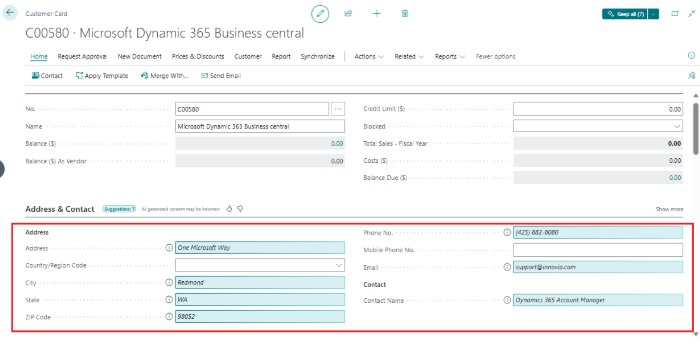
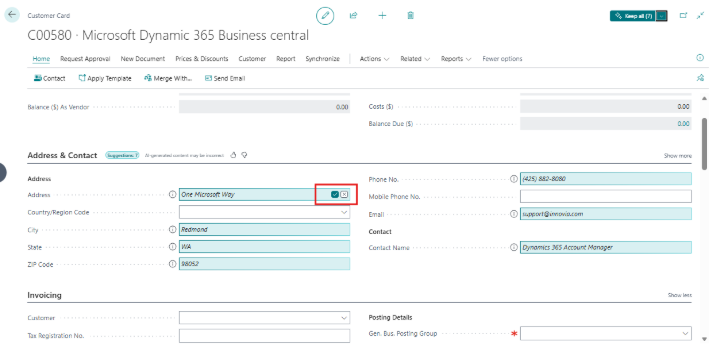
F. Users can review each suggestion and choose to accept or ignore it by clicking the check (✔) or cross (✖) icons in the field.
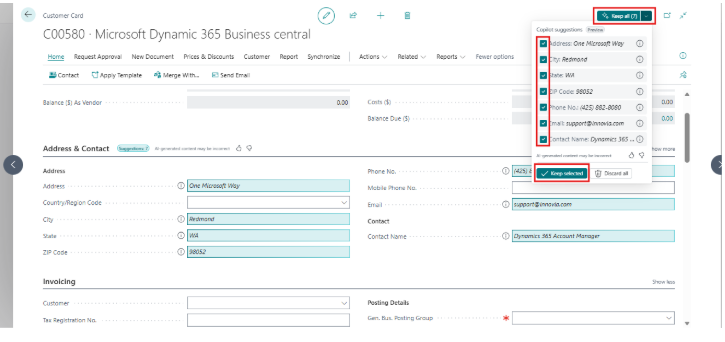
G. If all suggested information is correct, users can keep all values at once by clicking the Keep all button in the top-right corner, without selecting each field individually.
Important Notes
• This feature is a production-ready preview, available in both production and sandbox environments.
• Production-ready previews are subject to supplemental terms of use.
• The feature primarily supports English and selected languages; behavior may vary in other languages.
• AI-generated suggestions should always be reviewed, as they may occasionally be incorrect.
• Business Central does not use customer data to train AI models—your data remains private and secure.
Security, Privacy, and AI:
Microsoft Copilot follows Microsoft’s enterprise-grade standards for security, privacy, compliance, and responsible AI. Customer data is protected at all times, and web-based suggestions are used only to assist users during data entry—not to store or train AI models.
Conclusion
The Autofill Contact Details with Copilot feature brings meaningful AI-powered assistance to everyday data entry in Microsoft Dynamics 365 Business Central. By reducing repetitive typing, improving accuracy, and speeding up record creation, this enhancement helps users focus on higher-value work.
As part of Microsoft’s ongoing investment in intelligent automation, Copilot continues to make Business Central smarter, faster, and easier to use—especially for organizations managing large volumes of customer and vendor data.