How to Display Hidden Sales Order Agent or Payables Agent Icons in Microsoft Dynamics 365 Business Centra
 By Inkey Solutions
July 24, 2026
2 min read
By Inkey Solutions
July 24, 2026
2 min read
Introduction
Microsoft Dynamics 365 Business Central allows administrators to manage Copilot and Agent capabilities based on their organization’s needs. If the Sales Order Agent or Payables Agent has been deactivated earlier, you can easily reactivate it.
This guide explains how to activate these agent capabilities and restore their icons to the interface.
Business Value
Reactivating the Sales Order Agent or Payables Agent helps organizations take advantage of AI-driven automation, such as:
- Sales Order Agent – Automates sales order creation and processing.
- Payables Agent – Enhances vendor invoice processing with intelligent automation.
These tools boost productivity, reduce manual work, and streamline transaction processes.
Requirement
How can you reactivate a previously deactivated Sales Order Agent or Payables Agent in Business Central?
Prerequisites
- Microsoft Dynamics 365 Business Central (2025 Release Wave 2 or later).
- Administrator or Super user permissions.
Steps to Activate the Sales Order Agent or Payables Agent
- If the Sales Order Agent or Payables Agent is hidden, it will not be displayed on the Role Center page.
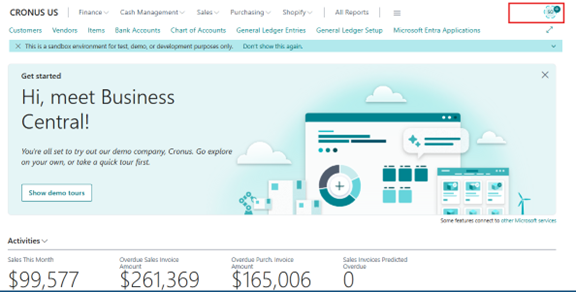
- Open the Search (Tell Me) feature and search for “Copilot & Agent Capabilities.”
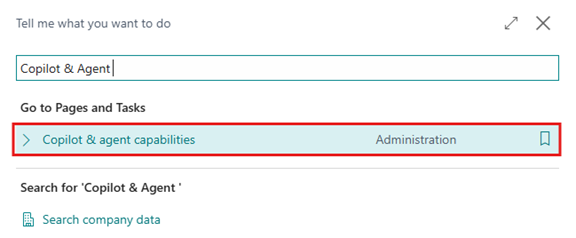
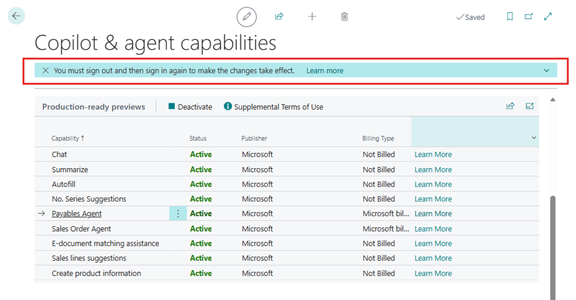
- The system will open the Copilot & Agent Capabilities page, which lists all available AI-driven functions. Locate the inactive functionality you want to enable:
- Sales Order Agent
- Payables Agent
Select the inactive feature. The “Activate” option will appear in the menu bar. Click Activate.
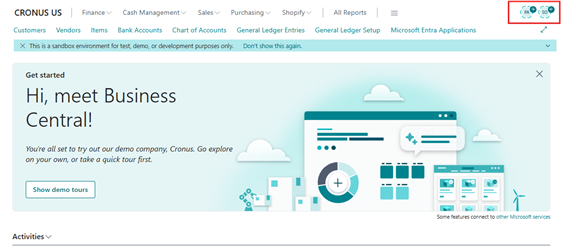
- After activation, the system will show a notification instructing the user to sign out of Business Central and sign in again to apply the changes.
- Once the user logs back in, the corresponding agent icon (Sales Order Agent or Payables Agent) will appear again in the upper-right corner of the interface.
Important Notes:
- Activation affects the entire environment and is applied for all users.
- Activating an agent enables its AI-driven functions, making the features available throughout Business Central.
- You can deactivate or reactivate these capabilities anytime using the same page.
Conclusion
Reactivating the Sales Order Agent or Payables Agent in Business Central is quick and straightforward. With just a few steps, organizations can restore access to powerful AI-driven features that simplify daily operations, automate routine tasks, and improve overall productivity.