How to Resize Columns in Microsoft Dynamics 365 Business Central Without Personalization?
 By Inkey Solutions
April 10, 2026
2 min read
By Inkey Solutions
April 10, 2026
2 min read
Introduction
Microsoft Dynamics 365 Business Central continues to improve user experience by offering greater flexibility in working with data. With the 2024 Release Wave 2, users can now resize columns in list pages even when personalization is disabled. This makes it easier to view, compare, and enter data efficiently without relying on UI customization.
Business Value
By allowing users to resize columns independently of personalization, Business Central ensures smoother navigation and improved readability across all roles and devices.
- Users can adjust data layouts instantly without depending on role-based customization.
- Column widths can be tailored for each device, improving comfort and productivity.
- Dropdown lookups, Copilot dialogs, and other list-based views also benefit from column resizing.
Overall, this feature boosts efficiency, making Business Central more adaptable to user preferences.
Requirement
How to resize and manage column widths in Business Central?
Prerequisites
- Ensure you are using the latest version of Microsoft Dynamics 365 Business Central (2024 Release Wave 2 or later).
- Verify that you are working on pages or page types that support list views.
Solution (Implementation Steps)
- Open any list page in Business Central, such as Customer List or Sales Order List.
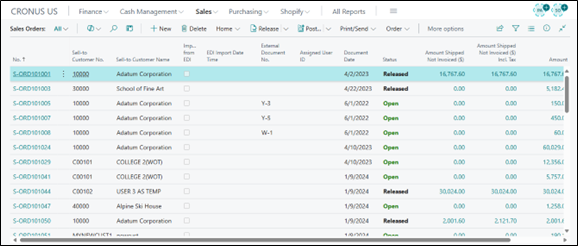
- Hover your cursor over the divider line between two column headers.
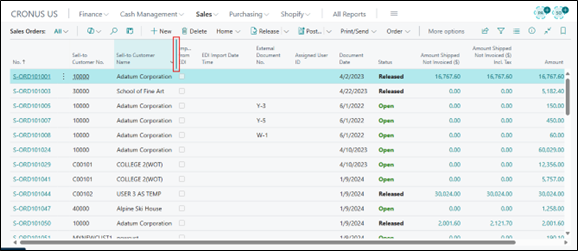
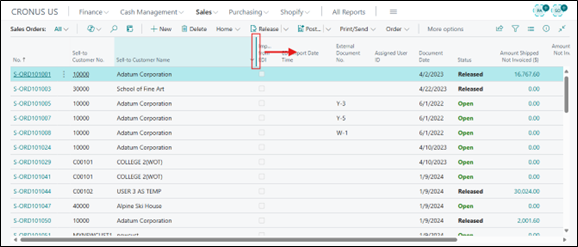
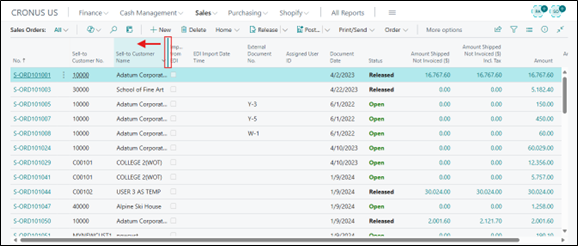
- Drag the divider left or right to adjust the column width. Alternatively, double-click the divider to auto-fit the column size.
- Right:
- Left:
- Double Click:
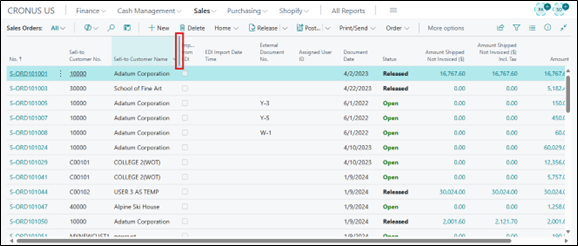
Repeat the adjustment for other columns as needed. Business Central remembers your column width preference on each device. If you use multiple browsers or devices, you can adjust widths independently for each.
- Right:
Note:
Keep in mind that if you use in-private/incognito browsing or clear your browser history, your column width preferences will be reset.
Conclusion
The ability to resize columns without enabling personalization is a practical yet impactful enhancement in Microsoft Dynamics 365 Business Central. It gives users flexibility, faster navigation, and better control over how data is displayed. With preferences saved per device and page, this feature helps teams work more comfortably and efficiently, making day-to-day operations smoother.