Power BI Web API Integration with Bearer Token & Refresh Configuration
 By Inkey Solutions
May 5, 2026
3 min read
By Inkey Solutions
May 5, 2026
3 min read
Introduction
Power BI provides robust capabilities to integrate external data sources, including REST APIs, through Power Query. This enables organizations to bring real-time or near-real-time data into their reporting layer for enhanced decision-making.
In enterprise scenarios, APIs often require secure authentication mechanisms such as Bearer Tokens, along with structured request handling large datasets through pagination. Additionally, ensuring that such integrations support scheduled refresh in the Power BI Service is critical for maintaining data consistency and automation.
This blog outlines a scalable and production-ready approach to connecting APIs using Bearer Token authentication, retrieving data efficiently, and configuring the solution to support seamless refresh in the Power BI Service.
Authentication: Bearer Token
Most modern APIs use token-based authentication to ensure secure access. A common approach is Bearer Token authentication, where a token is passed in the request header.
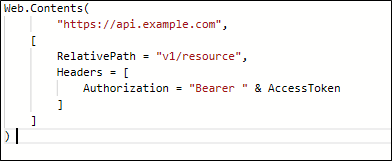
In Power Query (M language), this token is included within the Headers parameter of the Web.Contents function.
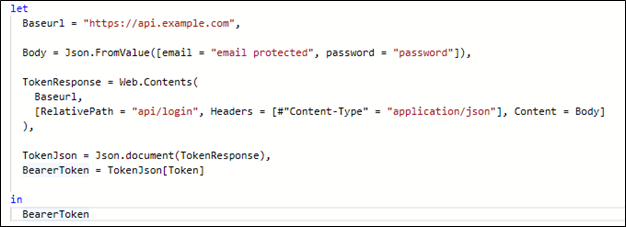
This returns a JSON with a “token” field.
Fetching Data from the API
Once authentication is configured, data can be retrieved by calling the required API endpoints using Web.Contents.
A critical best practice while designing API-based data sources in Power BI is the use of the RelativePath parameter instead of dynamically building full URLs.
**Why RelativePath is Important
- Power BI Service requires a static base URL to allow scheduled refresh.
- If the full URL is dynamically constructed, Power BI treats it as a dynamic data source, leading to refresh failures.
- By separating:
- Base URL → fixed
- Endpoint & parameters → dynamic via RelativePath and Query
This structure allows Power BI Gateway and the cloud service to handle the requests dynamically yet reliably.
Using RelativePath is not just a coding preference — it is essential for enabling scheduled refresh and making your API integration production-ready.
Handling Paginated Results
Many APIs split large result sets into pages. For example, some APIs’ user lists return a limited number per call and include a page parameter. To retrieve all pages, we typically loop or recurse.
Here’s an example M function to fetch every page of an endpoint:
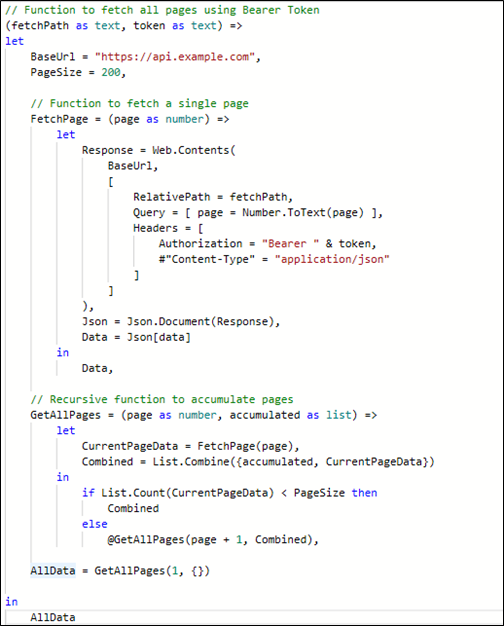
This function (GetAllPages) keeps fetching pages starting at 1, adding results to a list, and stops when a page returns fewer items than the page size (indicating the last page). The final output is a single combined list of all records. This technique is needed “since each paging mechanism is different” but essential when APIs break data into pages.
Conclusion
In conclusion, integrating REST APIs with Power BI requires a structured approach that balances security, scalability, and service compatibility. By implementing Bearer Token authentication, handling paginated data efficiently, and leveraging the Web.Contents function with a fixed base URL and RelativePath, you can build a robust and refreshable data pipeline.
The use of RelativePath plays a critical role in ensuring that datasets function seamlessly in the Power BI Service, enabling scheduled refresh without errors. By following these best practices, developers can confidently connect to a wide range of APIs and deliver reliable, automated reporting solutions.