Use the Account Payable Role Center in Microsoft Dynamics 365 Business Central
 By Inkey Solutions
August 14, 2026
3 min read
By Inkey Solutions
August 14, 2026
3 min read
Introduction:
Microsoft Dynamics 365 Business Central continues to improve user productivity with each release. In the 2025 Release Wave 2 (BC27.1) update, Microsoft has introduced a new Account Payable (AP) Role Center designed specifically for Accounts Payable teams. This Role Center centralizes all AP-related tasks—such as processing purchase invoices, handling incoming e-documents, and managing vendor payments—into one unified workspace, making daily operations faster and more efficient.
Business Value:
Previously, AP users had to navigate across multiple menus to manage purchase invoices, vendor balances, payments, and inbound electronic documents. This increased workload and the chance of missing important tasks.
With the new Account Payable Role Center, users can now:
- Access all AP tasks from a single dashboard
- Quickly process e-invoices and PDF documents
- Monitor vendor balances and pending invoices
- Manage payment runs more efficiently
This centralized workspace reduces manual effort, improves accuracy, and boosts productivity for AP teams.
Requirement:
How can you start using the new Account Payable Role Center in Business Central?
Prerequisites:
- Access to Microsoft Dynamics 365 Business Central (BC27.1 or later)
- Permission to change your Profile/Role Center
- Basic access to AP-related pages (Purchase Invoices, Vendors, Incoming Documents)
With this update, Microsoft has introduced a dedicated new role:
Accounts Payable Administrator
Solution (Implementation Steps):
- Click on the Search icon and search for “Profiles (Roles)”.
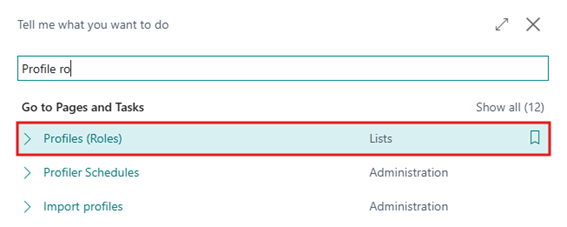
- In list of roles, locate Accounts Payable Administrator.

- Click on the Gear
icon from the top of menu bar and select for “My Settings”.
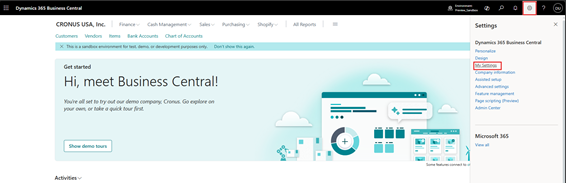
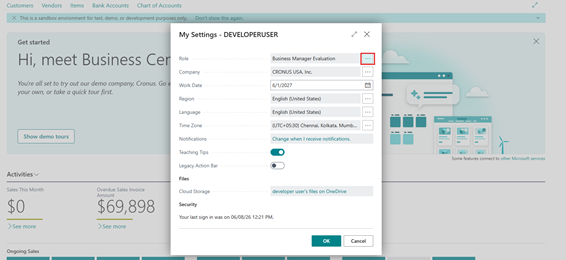
- Click on the three dots (⋯) in the Role field from the My Settings page, then select the “Accounts Payable Administrator” profile and click on Ok.
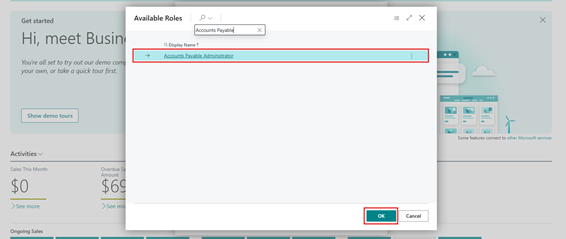
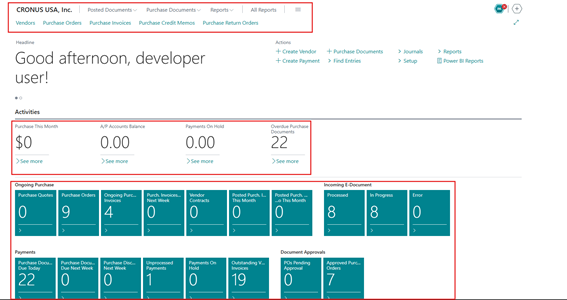
- After switching roles, Business Central opens the new AP dashboard.
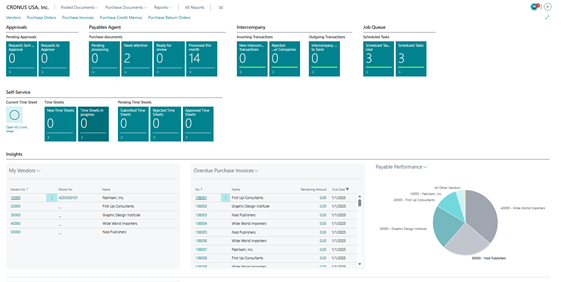
From here, users can access: - Purchase Orders and Purchase Invoices
- Incoming e-documents (e-invoices and PDFs)
- Vendor cards and vendor ledger entries
- Payment journals and pending payment tasks
- AP-specific activities and tiles
This gives a complete overview of all Accounts Payable operations in one interface.
- From the Role Center, AP users can:
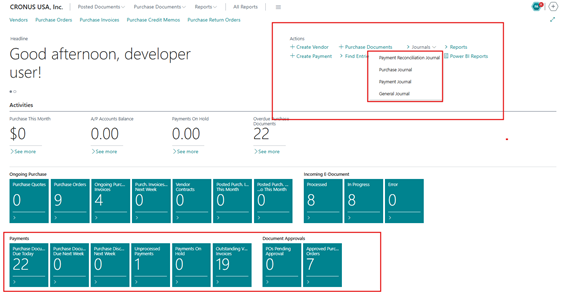
- Open Payment Journals
- Run Suggest Vendor Payments
- View pending or overdue vendor payments
- Post payment batches
This simplifies the entire payment cycle and enhances control over vendor transactions.
Restrictions & Notes:
- This Role Center is available only in BC 2025 Wave 2 (BC27.1) and later versions.
- Users can further personalize tiles, fields, and cues to match their AP workflow.
- The Role Center is optimized for AP tasks only and should be used by users responsible for payable processes.
Conclusion:
The Account Payable Role Center in Business Central 2025 Release Wave 2 provides a dedicated, streamlined workspace for Accounts Payable teams. By centralizing all AP activities—purchase documents, vendor payments, and incoming e-documents—it reduces navigation time, enhances accuracy, and increases operational efficiency. This update makes AP management easier, faster, and more organized for businesses of all sizes.