How to Audit User and Group Permissions Across Apps in Microsoft Dynamics 365 Business Central?
 By Hetal Tank
October 16, 2026
2 min read
By Hetal Tank
October 16, 2026
2 min read
Introduction
In the 2026 Release Wave 1 update of Microsoft Dynamics 365 Business Central, Microsoft introduced a powerful feature called the Permissions Overview page. This feature gives administrators a complete and centralized view of permission sets across all installed apps and extensions. It helps users easily analyze access rights and improve overall system security.
Business Value
Managing permissions across multiple apps and extensions can be complex. The new Permissions Overview page simplifies this process by providing all details in one place.
With this feature:
- Users can view all permissions in a single screen
- Makes it easier to identify who has access to what
- Helps in performing security audits quickly
- Reduces time spent navigating multiple pages
- Improves troubleshooting of access-related issues
Requirement
How to audit user and group permissions across apps in Microsoft Dynamics 365 Business Central?
Prerequisites
- Ensure you are using Business Central 2026 Release Wave 1 or later
- Users must have permission to access and review security settings
Solution (Implementation Steps)
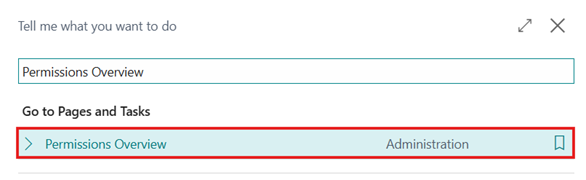
- Click on the Tell Me (Search) icon
in the top-right corner and Search for “Permissions Overview”, select the related link to open the page.
- On the Permissions Overview page, users can see permissions from all apps and extensions in a unified view.
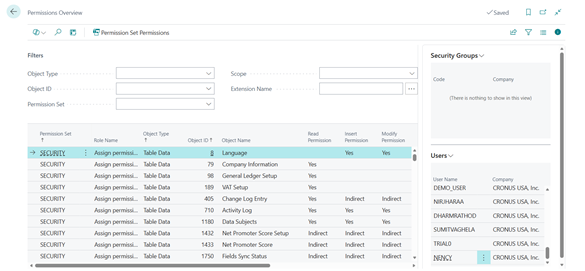
This includes permission sets from both standard and installed extensions.
- User can apply filters to quickly find relevant data based on:
- Object Type (Table Data, Table, Report, Codeunit, XMLport, MenuSuite, Page, Query, System)
- Object Id
- Permission Set
- Scope (User-Defined, Extension, System)
- Extension
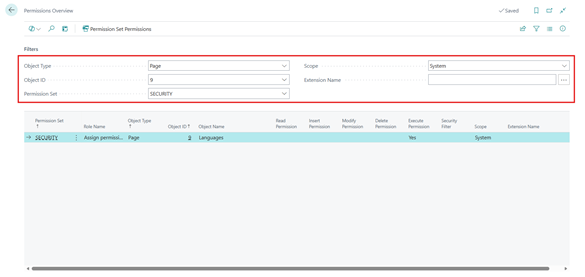
This helps users locate specific access details without searching multiple pages. Users can identify which permission sets grant access to a specific object.
- Use the FactBoxes on the page to see:
- Which users are assigned to a permission set
- Which security groups are linked to that permission set
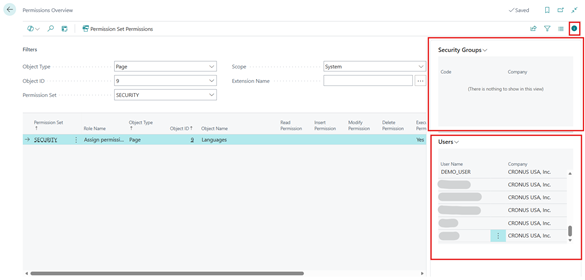
This helps in understanding permission distribution across the organization.
Conclusion
The Permissions Overview feature in Microsoft Dynamics 365 Business Central (2026 Release Wave 1) makes it much easier to audit and manage permissions. By providing a centralized and detailed view, it helps administrators improve security, quickly troubleshoot access issues, and ensure that users have the correct level of access.