Creating Basic Forms in Power Pages: A Beginner’s Guide
 By Inkey Solutions
January 30, 2026
2 min read
By Inkey Solutions
January 30, 2026
2 min read
Power Pages offers a Basic Form feature that supports low-code/no-code development, making it easier for users to interact with data from the Dataverse.
A Basic Form allows users to create, read, and update records in a Dataverse table through a user-friendly interface on the portal. These forms are directly connected to Dataverse tables and always pull data from those tables.
Key points:
- Only Dataverse tables are supported. You cannot use external data sources.
The form is based on model-driven form definitions created in Dynamics 365.
You can configure multiple tabs, sections, and fields based on your needs.
Web roles and permissions ensure users can only access or edit data they are authorized for.
Step-by-Step: Creating a Basic Form
Step 1: Create or Open a Power Pages Site
- Go to Power portal management.
- Select “Create a site” or open an existing site.
- Choose a template or start with a blank layout.
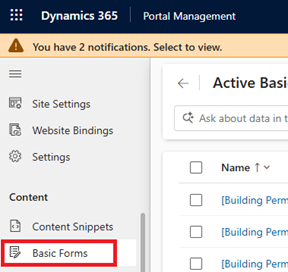
Step 2: Add a Dataverse Table
To configure a Basic Form in Power Pages:
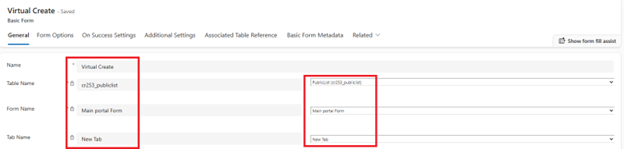
- Provide a Name for the Basic Form to uniquely identify it.
- Set the Table Name – choose the Dataverse table from which the data will be used.
- Select a Form – pick an existing form from the selected table (created in Dynamics 365).
- Configure Sections and Tabs – the structure (tabs and sections) will automatically reflect the selected form layout, which can be further customized if needed.
Step 3: Create a Form in Power Pages
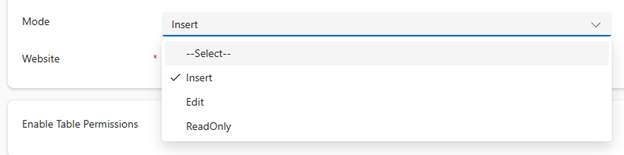
Choose Form Type:
- Insert: To create new records.
- Edit: To update existing records.
- Read-only: To display data without editing.
Step 4: Set Permissions
- Go to the Table Permissions.
- Create or edit a permission set to allow anonymous or authenticated users to submit data.
- Link the permission to your web role (Example: Anonymous Users for public forms).
Create table permissions for the form’s related table.
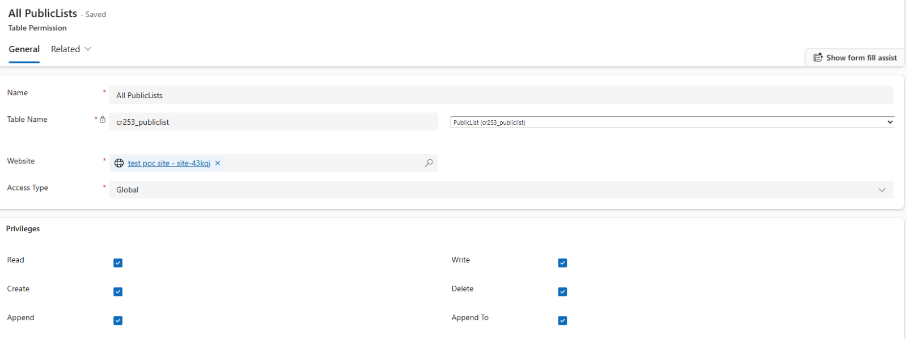
Enable table permission from form

Step 5: Preview and Publish
Click Preview to test the form.
Once satisfied, hit Publish to make it live on your site.
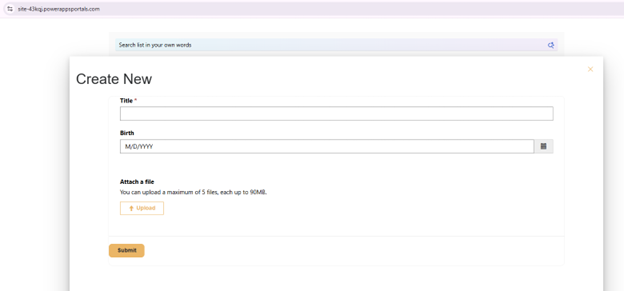
Form UI:
Conclusion
Basic Forms in Power Pages offer an easy way to create, view, and update Dataverse records with minimal coding. They help deliver secure and user-friendly data interaction through portal pages.