Level Up Your Basic Forms with Metadata and JavaScript Customization in Power Pages
 By Inkey Solutions
January 20, 2026
3 min read
By Inkey Solutions
January 20, 2026
3 min read
Power Pages basic forms are used to connect with a single Dataverse table. They allow users to create, update, and view records directly within the site.
Basic forms are mostly embedded with lists to perform CRUD (Create, Read, Update, Delete) operations on Dataverse tables.
Form Action Button Configuration
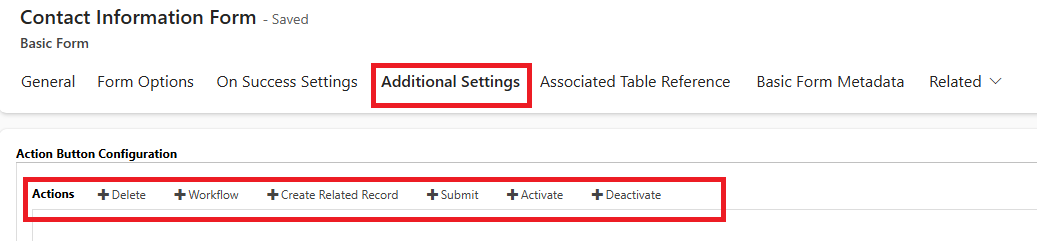
Under Additional Settings of a basic form, you can configure action buttons that allow users to perform specific operations on a single record. Here’s a brief explanation of each:
| Button | Perform Action |
|---|---|
| Delete | Allows users to delete the current record directly from the form. |
| Workflow | Triggers an on-demand workflow defined in Dataverse for the selected record. |
| Create Related Record | Opens a new form to create a related record (based on a relationship with the current entity). |
| Submit | Used for final submission scenarios (Example: applications or forms requiring review). |
| Activate | Changes the status of the record to “Active” (commonly used for entities with status fields). |
| Deactivate | Marks the record as “Inactive” often used to archive or disable a record without deleting it. |
Custom JavaScript
Custom JavaScript is used to manage UI actions such as showing or hiding fields and getting or setting field values. It uses simple jQuery to perform tasks on the form. JavaScript can also be used to apply field-level validations.
Below is an example of using JavaScript in the onload event of a basic form:
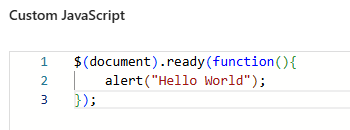
Output:

Metadata
Metadata provides additional behavior that is not available in basic forms out of the box. It allows you to apply advanced logic and override certain functionalities of form fields that cannot be handled directly through standard configuration. Metadata is used to extend and customize the form’s behavior without modifying the core form logic.
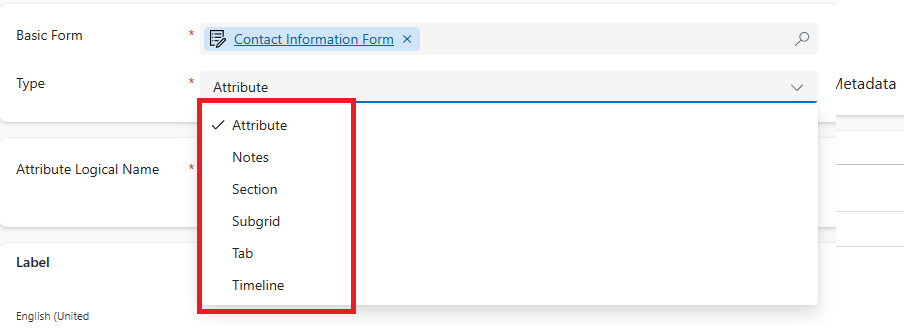
There are various types of metadata available in a Power Pages basic form:
- Attribute – Customize the behavior of individual fields (Example: make fields read-only, set default values).
- Note – Enable or customize the notes (annotations) section on the form.
- Section – Control the visibility or behavior of specific sections within a tab.
- Sub grid – Manage how related records (grids) are displayed or interacted with.
- Tab – Customize the display and logic of different tabs on the form.
- Timeline – Show related activities such as emails, appointments, and notes in a timeline view.
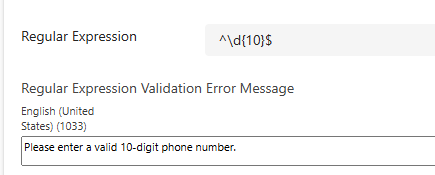
Another important key feature in metadata is Regular Expression support. Regular expressions are used to validate field values. Example, validating a 10-digit mobile number to ensure correct input format.
Conclusion
Metadata and JavaScript help you enhance basic forms in Power Pages by adding custom logic, validations, and UI controls, making your forms more dynamic and user-friendly.