Understanding the Disabled Personalization Boolean in the Profile (Role) Page of Microsoft Dynamics 365 Business Central
 By Hetal Tank
October 8, 2026
3 min read
By Hetal Tank
October 8, 2026
3 min read
Introduction
Microsoft Dynamics 365 Business Central provides flexibility by allowing users to personalize their workspace. They can resize columns, rearrange fields, or hide elements that are not relevant to their daily tasks. However, administrators may want to control this behavior for certain roles to maintain consistency and compliance.
This is where the Disabled Personalization Boolean in the Profile (Role) page comes into play. By enabling this option, administrators can prevent users assigned to that role from making personalization changes.
Business Use Requirement
Organizations may choose to disable personalization for specific roles due to:
- Standardization: Ensuring all users in a role work with the same layout, which reduces confusion and training needs.
- Compliance and Control: In regulated industries, maintaining a consistent system view is important for audits and governance.
- Support Efficiency: IT teams can better manage support requests when all users follow a uniform workspace.
- Preventing Errors: Avoiding accidental layout changes that could disrupt workflows.
Solution
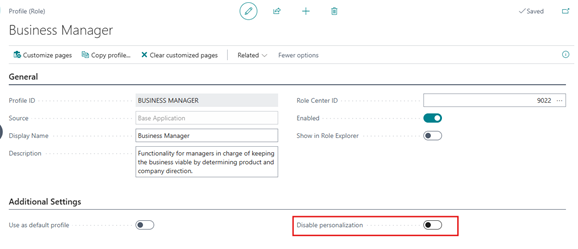
The Disabled Personalization Boolean is located on the Profile (Role) page in Business Central.
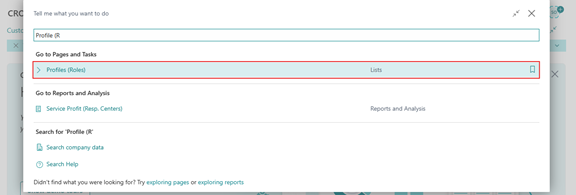
- Click on the global Search icon, type Profiles (Roles), and select it from the results to navigate to the page.
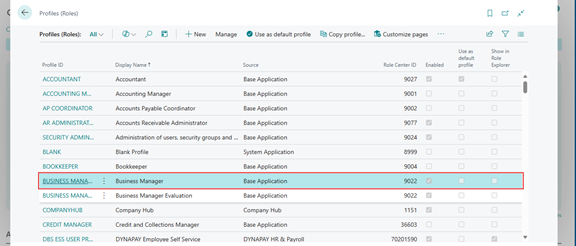
- Select the profile (role) where you want to control personalization—for example, Business Manager or Accountant.
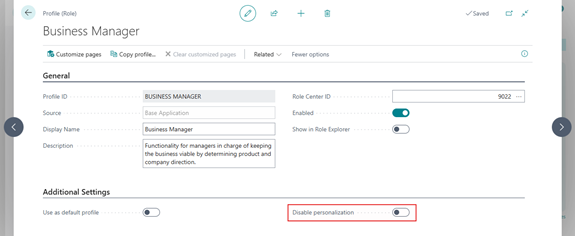
- Locate the field Disabled Personalization (Boolean checkbox).
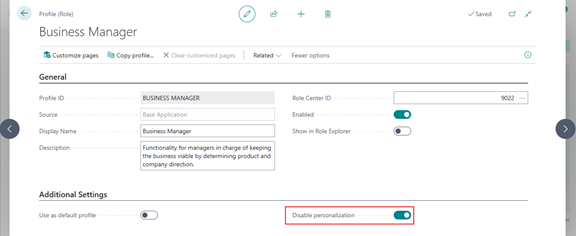
- Turn it ON (checked) to prevent users of that role from making any personalization changes.
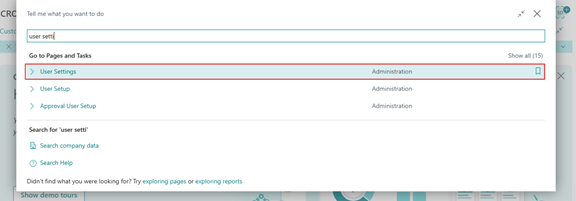
- Click on the global Search icon, type User Settings, and select it from the results to navigate to the page.
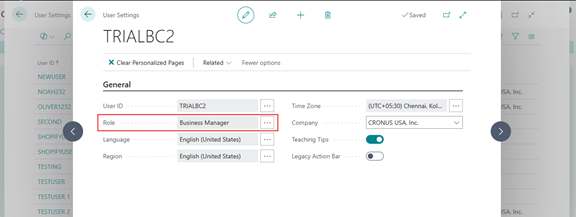
- Select the user and assign the role to a user.
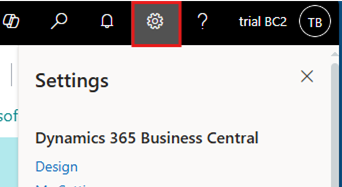
- Now User need to Refresh the Page and click on Settings icon from the top right corner.
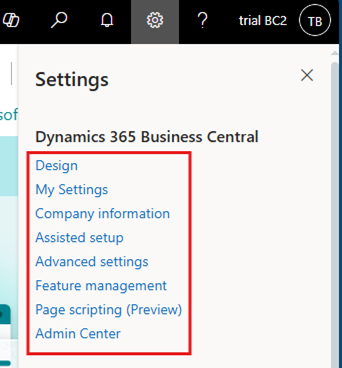
- Here user can see that system remove the “Personalization” option from the given list.
- Users will not be able to resize, move, or hide fields and columns.
- If they attempt to personalize, they may see an error message:
“An error occurred while applying personalization changes. Please try again.”
- Turn it OFF (unchecked) Disabled Personalization Boolean if user want in that role to have full personalization capability.
Conclusion
The Disabled Personalization Boolean in the Profile (Role) page is a powerful administrative control in Microsoft Dynamics 365 Business Central. It allows organizations to balance flexibility and standardization:
- Users in roles with personalization disabled work in a uniform environment.
- Admins retain full control of layouts through role-based customization.
- Businesses benefit from reduced complexity, improved compliance, and streamlined support.
By using this feature strategically, organizations can decide when to empower users with personalization and when to enforce consistent layouts across the system.